PTZ Camera Features
High-Definition Video Quality
Video quality is one of the most important factors when choosing a PTZ camera. Depending on the model, PTZ cameras may offer Full HD, 4K and professional video output options suited to different workflows.
A 1080p PTZ camera can be a strong choice for everyday streaming, conferencing and internal communications, while 4K PTZ cameras provide extra detail for broadcast, hybrid events, cropping flexibility and more polished production environments.
For live streaming, education and corporate video, sharp image quality helps your audience stay engaged. For broadcast and professional production, it supports a cleaner, more reliable visual standard across the entire setup.
Pan, Tilt, and Zoom Capabilities
The main advantage of a PTZ camera is movement. Remote pan, tilt and zoom control allows you to adjust framing without physically touching the camera, making it easier to capture speakers, performers, classrooms, panels or large spaces.
This is especially helpful when cameras are mounted high, positioned in hard-to-reach areas or used as part of a multi-camera setup. Many PTZ cameras also support preset positions, allowing operators to quickly jump between key angles during a livestream or recording.
For production teams, this means greater control. For solo operators, it can make complex shoots much easier to manage.
Connectivity Options
PTZ cameras are built for connected video workflows. Depending on the model, they may support options such as HDMI, SDI, USB, IP streaming, NDI or network-based control.
Wired PTZ camera setups are often preferred for professional environments where reliability and low-latency performance matter. Network-based options can make installation and remote control more flexible, especially across larger venues, classrooms or production spaces.
Before choosing a PTZ camera, it’s important to consider how it will connect to your existing gear, including switchers, computers, capture cards, controllers, audio systems and streaming platforms.
Low-Light Performance
Good low-light performance is important for venues, events and monitoring environments where lighting conditions are not always perfect. Some PTZ cameras are designed with strong low-light sensitivity, helping maintain usable image quality in dimmer rooms or mixed lighting.
This can be especially valuable for conference venues, houses of worship, lecture theatres, performance spaces and surveillance applications. If your PTZ camera will be used in changing light, prioritising sensor quality, lens performance and low-light capability can make a noticeable difference.
Applications of PTZ Cameras
Live Production
PTZ cameras are ideal for live production environments where flexibility, reliability and smooth remote control matter. From panel discussions and product launches to performances and multi-camera shoots, a PTZ camera allows production teams to capture multiple angles without needing a dedicated operator at every camera position.
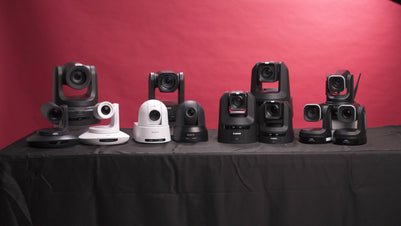
For flexible 4K production and streaming workflows, the Canon CR-N300 4K NDI PTZ Camera with 20x Zoom is a strong option, giving creators the reach and control needed for professional live capture. For more advanced cinematic production, the Sony FR7 Cinema Line PTZ Camera brings PTZ control into a cinema-style camera system.
Education
In classrooms, lecture theatres and training rooms, PTZ cameras support remote learning, hybrid education and recorded presentations. They can be used to capture lecturers, whiteboards, demonstrations, panels and audience interaction with minimal disruption to the room.
For schools, universities and training providers, the Canon CR-N350 Remote Camera offers a practical solution for delivering clear, professional video to remote participants while keeping the in-room experience natural. Preset camera positions can also help operators move quickly between a presenter, screen, demonstration area or wide room view.
Houses of Worship
PTZ cameras are a strong fit for houses of worship looking to livestream services, ceremonies, sermons and community events. Their discreet design and remote operation make it easier to capture meaningful moments without placing camera operators in the middle of the space.
With the ability to move between wide congregation shots, close-ups of speakers, musicians or ceremony details, PTZ cameras help create a more engaging viewing experience for remote audiences. The Canon CR-N400 Remote Camera is well suited to larger spaces where dependable remote capture, image quality and flexible control are essential.
Corporate Communications
For businesses, PTZ cameras can support boardroom meetings, webinars, internal communications, executive presentations, town halls and hybrid events. They make it easier to create professional video content without requiring a large production crew.
A well-planned PTZ setup can help businesses improve the quality of their live and recorded communications, giving remote teams, clients and stakeholders a clearer, more polished viewing experience. For higher-end corporate production environments, the Canon CR-N500 Professional 4K NDI PTZ Camera with 15x Zoom is a premium option for polished, reliable video output.
Event Streaming
PTZ cameras are widely used for event streaming, including conferences, panels, awards nights, performances, workshops and online broadcasts. Their remote-control functionality makes them ideal for capturing different angles in real time while keeping the setup efficient and unobtrusive.
For event organisers, venues and creators, a PTZ camera can help deliver a more professional stream, with smooth transitions between speakers, audiences, stages and presentation areas. Depending on the scale of the event, options like the Canon CR-N300, Canon CR-N350 and Canon CR-N500 can support a wide range of professional streaming workflows.
Why Choose George’s for PTZ Cameras?
George’s Cameras has supported Sydney’s creative community for over 40 years, helping photographers, filmmakers, content creators and production teams find the right gear for their craft.
When you shop PTZ cameras with George’s, you get access to trusted brands, carefully selected products and practical advice from a team that understands real-world production needs. Whether you’re building a livestream studio, upgrading a boardroom, fitting out an education space or creating a professional broadcast workflow, we can help you compare models and choose the setup that suits your goals.
Our team can also guide you through compatible accessories, control options, mounting considerations and connectivity requirements, so your PTZ camera works smoothly with the rest of your equipment.


-v1665700116905.png?500x500&options=w_150)