Why Choose a USB Microphone for Podcasting?
USB podcast microphones are popular because they make better audio more approachable. They are especially useful if you want a clean desktop setup without extra boxes, cables or technical steps.
A USB microphone is ideal for:
- Podcasting
- Zoom calls
- Microsoft Teams meetings
- Riverside interviews
- OBS streaming
- YouTube videos
- Online courses
- Webinars
- Voiceovers
- Gaming and livestreaming
- Remote work and presentations
For many creators, the biggest benefit is convenience. You can record directly into your computer, use familiar software and avoid needing to understand gain staging across an interface or mixer before getting started.
Featured USB Podcast Microphones at George’s Cameras
Boya BY-PM500 USB Table Microphone
The Boya BY-PM500 USB Table Microphone is a practical choice for creators who want a straightforward desktop microphone for podcasting, calls, streaming and content recording.
Its table-style design makes it easy to set up on a desk, which is helpful for beginners, students, remote workers and anyone recording in a simple home environment.
Rode X XCM-50 Compact USB-C Condenser Microphone
The Rode X XCM-50 Compact USB-C Condenser Microphone is built for creators who want a compact USB-C microphone for streaming, podcasting, gaming and voice recording.
It suits desk-based setups where space matters, while still offering a more polished sound than standard computer audio. It’s a strong fit for OBS, YouTube content, online courses and live creative work.
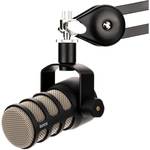
Rode PodMic USB and XLR Dynamic Broadcast Microphone
The Rode PodMic USB and XLR Dynamic Broadcast Microphone gives creators the best of both worlds. You can plug it in via USB for a simple setup now, while still having XLR connectivity if you want to expand into an interface or mixer later.
Its dynamic design makes it especially useful for podcasting, streaming and voice recording in everyday rooms, where controlling background noise and room echo can be important.
Shure Motiv MV7 Podcast Microphone
The Shure Motiv MV7 Podcast Microphone with XLR, USB and Headphone Output is a popular choice for creators who want a podcast-focused microphone with flexible connection options.
Use USB for a direct computer setup, or XLR if you later move into a more advanced recording workflow. It’s well suited to podcasting, voiceover, remote interviews, livestreaming and professional video calls.
Sennheiser Profile USB Microphone
The Sennheiser Profile USB Microphone is an approachable USB microphone for podcasting, streaming, recording and everyday content creation.
It’s a strong option for creators who want clear voice capture in a simple format, making it useful for solo podcast episodes, online teaching, webinars, remote work and desktop video production.
USB vs XLR for Podcasting
USB and XLR microphones can both deliver excellent results, but they suit different workflows.
USB microphones are best when you want simplicity. They connect directly to your computer, require no audio interface and are easy to use with common platforms such as Zoom, Teams, OBS, Riverside and most recording software.
XLR microphones are better suited to more advanced setups where you want to use an audio interface, mixer, multiple microphones or a studio-style signal chain.
For many podcasters, educators and content creators, USB is the most practical place to start. It gives you noticeably better sound without asking you to build a full audio setup before you record.
Recording Software and Platform Compatibility
USB podcast microphones work with many popular recording, streaming and communication platforms. In most cases, you simply connect the microphone, select it as your input and start recording or broadcasting.
USB microphones are commonly used with:
- Zoom
- Microsoft Teams
- Google Meet
- OBS
- Riverside
- YouTube
- Twitch
- StreamYard
- GarageBand
- Audacity
- Adobe Audition
- Descript
- Online learning platforms
Compatibility can vary depending on your device, operating system and microphone model, so it’s always worth checking the product details before buying. If you’re unsure, George’s Cameras can help you choose a microphone that suits your platform and setup.
What to Look for in a USB Podcast Microphone
The right USB podcast microphone depends on how and where you record. A solo podcaster working at a desk may need something different to a course creator, streamer or remote professional.
When choosing a USB microphone, consider:
- Connection type, such as USB-C or USB-A
- Pickup pattern
- Built-in headphone monitoring
- Desk stand or boom arm compatibility
- Dynamic vs condenser design
- Size and portability
- Recording space and background noise
- Compatibility with your preferred software
- Whether you may want XLR in the future
If your room is untreated or has background noise, a dynamic USB microphone can be a smart choice. If your space is quiet and controlled, a condenser USB microphone can offer a detailed, polished vocal sound.
Accessories for a Better USB Microphone Setup
A USB microphone can work well on its own, but a few accessories can make recording more comfortable and consistent.
Useful accessories include:
- Boom arms
- Desk stands
- Pop filters
- Shock mounts
- Closed-back headphones
- USB cables
- Acoustic panels
- Windscreens
- Cable clips
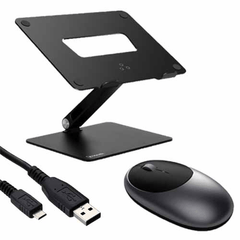
- Laptop stands
A boom arm helps position the microphone closer to your mouth, which usually improves voice quality. A pop filter helps reduce harsh breath sounds. Headphones help you monitor your audio and catch problems before they affect the final recording.
Why Choose George’s for Podcast Microphones?
George’s Cameras supports creators across photography, video, audio, streaming and content production. That means we understand how podcast microphones fit into a broader creative setup, whether you’re recording audio only or pairing your microphone with cameras, lighting and video gear.
Our team can help you compare USB microphones, understand connection types and choose gear that suits your recording space, software and creative goals. Whether you’re starting a podcast, improving your online course audio or upgrading your livestream setup, we can help you find a practical solution.
Getting Started with USB Podcasting
Starting a podcast or recording setup does not need to be complicated. Choose a quiet space, plug in your USB microphone, select it in your recording software and test your levels before you begin.
For better results, record close to the microphone, reduce echo where possible and use headphones while recording. Soft furnishings, curtains and rugs can help reduce room reflections, while a boom arm can make microphone placement easier.
A simple USB podcast setup might include:
- A USB podcast microphone
- Closed-back headphones
- A boom arm or desk stand
- Recording software
- A quiet room
- Basic editing tools
From there, you can build your setup over time as your podcast, stream or content workflow grows.
Explore USB Podcast Microphones at George’s Cameras
Whether you’re recording your first episode, teaching online, joining remote interviews, streaming through OBS or creating content for YouTube, George’s Cameras has USB podcast microphones to help you sound clearer and more confident.
Explore the range online or visit us in Sydney for friendly, practical advice from a team that understands audio, video and the creative tools behind better content.


-v1665700116905.png?500x500&options=w_150)