
















-v1665700116905.png?500x500&options=w_150)



















































































































Rode RODECaster Video S Production Console
Rode RODECaster Video S Production Console
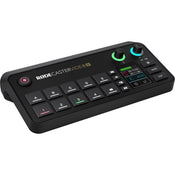
Designed as a streamlined version of its predecessor the RODECaster Video, the RODECaster Video S All-in-One Audio/Video Console offers the same, powerful video switching and recording, as well as studio-grade audio control for podcasters, streamers, and solo creators. The console offers intuitive control over both video and audio sources with its onboard controls, 2" touchscreen display, and rotary encoder. A variety of connectivity options, including HDMI and USB-C ports, NDI inputs, and both wired and wireless network connections. Add the RODECaster Video S to your preexisting Rode audio ecosystem using the USB-C audio ports or Rode Central software for advanced device configuration.
Video Interface
The RODECaster Video S features nine mix-effect layers that can simultaneously display in both preview and program views. Two downstream keyers toggle overlays and logo, two chroma-keyers toggle different backgrounds, and one luma keyer and two media players can play simultaneous MP4 video, PNG/JPG photos, or WAV audio from a USB SSD or flash drive.
Multiview allows you to visualise the program and preview, all the live inputs with scene and media thumbnails, the audio mixer and channel status, and recording/network/storage status, as well as runtime, date, and time information. Nondestructive setup means the process can be done live or configured as a saved scene without interrupting the flow of your production.
Switch between four 1080p60 video sources (three HDMI and one USB-C) and create complex scenes with multiple layers of video, media, and graphics. Save these scenes and recall them with the touch of a button.
You can also input up to four NDI streams such as PTZ cameras for streaming output.
Configure the single HDMI output to connect displays and view preview, program, and multiview feeds. Use the program feed to see what is being streamed/recorded and the preview feed to view inputs, scenes, graphics, or media sources before they go live.
Audio Sources
Two studio-grade combo XLR-1/4" jacks on the console are equipped with low-noise, high-gain Revolution Preamps to ensure pristine audio capture from XLR microphones and instruments.
Use digital USB-C ports to connect Rode USB microphones, the RODECaster Pro II, or Duo Audio Production Studios. Other USB-C ports support 2-in / 2-out multichannel outputs, mix-minus, and MFi protocols.
Internal wireless receivers can connect Rode series IV wireless microphones to the console, like the Wireless GO II and Wireless PRO.
Aphex VoxLab audio processing equips the RODECaster Video S with EQ, compressor, noise gate, high-pass filter, de-esser, Aural Exciter, Big Bottom, and Compellor effects per channel. Integrated preamps provide up to 75 dB input gain and -131.5 dBV equivalent input noise.
Mix and process audio onboard using the touchscreen and rotary encoder or the software mixer in Rode Central.
Rode Ecosystem Connectivity
The USB4 port on the RODECaster support select Rode USB microphones including the RODECaster Pro II and Duo.
Intuitive Controls
The RODECaster Video S prioritises scene-based switching with an intuitive control layout. This gives users quicker access to the tools they need to create dynamic content without needing to access complicated settings. The front panel of the device includes a wide variety of controls specific to certain features.
Automatic chroma keying makes replacing backgrounds with media or live video inputs a breeze. Apply transparency to use the input in scenes or with various backgrounds. Choose between blue and green screen with advanced controls.
Media buttons load video clips, images, and sounds onto a USB drive for use in your production. Two internal video players allow you to transition from one to another in your scene compositions.
Graphic buttons load images with transparency. Dynamically trigger graphics to transition over an input or scene.
Intelligent Auto-Switching
Intelligent auto-switching provides seamless and creative hands-free switching between video sources. Any audio input can be linked to any video source, allowing intelligent level detection to automatically trigger switching when your talent is speaking to follow the conversation. Switching priorities and screen time algorithms provides a natural feel, as if a producer or technical director were calling the shots.
Intuitive Streaming and Recording
Stream up to 100 Mb/s directly using RTMP/RTMPS to major platforms like YouTube, Twitch, and Facebook Live via integrated Wi-Fi 6 or Ethernet connection. Real-time signal health reporting is displayed via multiview. Up to four NDI sources, such as PTZ cameras, can be input with a single NDI output via Ethernet streaming. The Video S can also utilise dual-cam streaming using the free Rode Capture app for iOS.
Record directly to an external USB storage device or the internal 24GB media storage, including isolated (ISO) recording for more flexible postproduction workflows. You can record your program feed as an H.264/AVC MP4 file with embedded AAC stereo mix. Multiple audio tracks can be recorded as nine independent stereo WAV files.
Rode Central
Use the Rode Central companion software when connected to a computer to adjust more advanced features of the RODECaster Video S. Construct scenes using remote control, configure automatic switching based on audio inputs, mix audio, and configure streaming settings and profiles as well as adjust advanced settings and customisations. The software supports macOS and Windows operating systems.
Custom Scene Builder
The scene builder in Rode Central allows you to create a completely customised scene from scratch. Select a Rode preset with default layouts and themes for your keying backgrounds or video borders. A live RTMP feed will update to show your changes in real-time. You can save up to five scenes and switch between them instantly at the press of a button.
Wireless Remote Control
For setups where you can't be close to the console, the RODECaster Video S boasts complete wireless remote control via the RODECaster App, allowing you to switch inputs, adjust settings and configure complex scenes from your computer.
Key Features:
All-in-One Audio and Video Console
Switching, Streaming, Recording, Mixing
One USB-C and Three HDMI Video Inputs
Input, Stream, and Record up to 1080p
Wi-Fi and Gigabit Ethernet Streaming
Internal Graphic Storage, USB Recording
Receivers for Two Rode Series IV Mics
Combo Analogue and USB Digital Audio Input
NDI|HX2/HX3 PTZ Camera Support
Keying, Transitions, Overlays, Multiview
What's in the Box:
Rode RODECaster Video S Production Console
Power Supply
SuperSpeed USB-C to USB-C Cable
Price Match
Fill out the price match form below, and we will be in touch shortly.
Price Match
Fill out the price match form below, and we will be in touch shortly.
 If you'd like to know when it's due, we're here to help!
 Call us during business hours at
  Chat live with our team on-site.
 Or email us anytime at info@georges.com.au with the subject "Awaiting Arrival"
Checking availability...
Product Overview
Rode RODECaster Video S Production Console
Designed as a streamlined version of its predecessor the RODECaster Video, the RODECaster Video S All-in-One Audio/Video Console offers the same, powerful video switching and recording, as well as studio-grade audio control for podcasters, streamers, and solo creators. The console offers intuitive control over both video and audio sources with its onboard controls, 2" touchscreen display, and rotary encoder. A variety of connectivity options, including HDMI and USB-C ports, NDI inputs, and both wired and wireless network connections. Add the RODECaster Video S to your preexisting Rode audio ecosystem using the USB-C audio ports or Rode Central software for advanced device configuration.

Need advice?
Speak to one of our dedicated Australian-based sales team members.
Price Match
Fill out the price match form below, and we will be in touch shortly.
Price Match
Fill out the price match form below, and we will be in touch shortly.
Product Reviews
Blog posts

How We Lit Karla Spetic's Australian Fashion Week Show with P...
We were invited by Karla Spetic to help light her runway, we chose Profoto's new LED lights for the job!
View post
Sony A7R VI First Thoughts: A Portrait Photographer’s Take on...
Sony has just launched the new Sony A7R VI, the latest camera in its high-resolution Alpha line, and I was lucky enough to spend some time with it earlier this week. I...
View post
Mobile Podcasting Setups Explained: From First Rig to Full Pr...
Mobile podcasting isn’t about shortcuts. It’s about picking gear that actually works, in the places podcasts actually happen. I used to chase the “best” setup. Turns out, the best setup is the...
View post
Rigging Up Your Sony Cinema Camera
Rigging gets a bad rap because a lot of rigs are built backwards. People buy parts first, bolt everything on, and end up with a camera that looks serious but shoots worse....
View post
What Makes a Good Photographer? A Portfolio Deconstruction
Clyde Vaughan Guest post by Clyde Vaughan — ahead of Clyde's talk on January 22: “How to create incredible images: A talk by Clyde Vaughan”. If you ask “what makes a good...
View post
The End of the Generator? Hands-on with the DJI Power 2000
We’ve all been there: you’re on a remote shoot, beautiful location, but you’re either scrambling to find a power outlet or lugging a massive, noisy petrol generator through the bush. We’ve been...
View post
Why 2026 Might be the year to change from DSLR to Mirrorless
Alright—let’s do the DSLR vs mirrorless thing properly. Not “on paper”, not “in theory”, but head-to-head on the stuff that actually matters when you’re out shooting. My name's Oliver Minnett, I'm Georges...
View post
Leica is now at Georges Cameras
Some cameras don’t just document your life; they become part of it. I bought a Leica M6 in 2012. Photography had always been a part of my life; my dad had run...
View post
5 Things to Know Before You Upgrade Your Camera
Upgrading your camera? Learn the 5 things that matter: sensor size, ergonomics, lenses, power/media, and colour/screens—so you can choose the right camera with confidence.
View post
Canon G7X Mark III vs Sony, Panasonic, Ricoh & Fujifilm: Best...
Looking beyond the Canon G7X Mark III? We compare the best compact cameras from Sony, Panasonic, Ricoh and Fujifilm to help you choose the right model for 2025.
View post


