
















-v1665700116905.png?500x500&options=w_150)



















































































































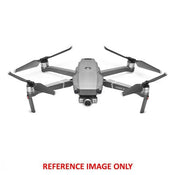
DJI Mavic 2 Zoom with 2x Optical Zoom (inbent only) - Demo Display
Note: Demo Display Model
The Mavic 2 Zoom from DJI is a professional quality filmmaking drone that gives you the ability to get closer to the action, thanks to its 2x 24-48mm optical zoom camera with a 1/2.3" 12MP sensor. With 4x lossless zoom (including 2x optical zoom) you can capture sensitive subjects from an even greater distance. There's even a single-tap aerial mode called Dolly Zoom that gives a Hitchcockian effect to your footage.
The Mavic 2 Zoom utilizes a low-drag aerodynamic body design for achieving speeds up to 44.7 mph, a four-cell LiPo battery for up to 31 minutes of flight time, and low-noise propellers for filming without being distracting. This power and performance are coupled with a variety of shooting modes and capabilities for cinematic results.
To help keep the Mavic 2 Zoom safe and in control, DJI has provided OcuSync 2.0 video transmission technology that can transmit a video feed to the included controller from up to five miles away in Full HD 1080p quality. There's also omnidirectional obstacle sensing that provides object avoidance with sensors on all sides of the Mavic 2 Zoom.
Additional Gimbal Camera Features
- Mid-range shots: Capture epic midrange shots with the 48mm telephoto lens, designed to compress your perspective and enhance the parallax effect.
- Hybrid autofocus: Combines phase and contrast detection for higher focus speed and accuracy, helping to keep subjects in focus while zooming in and out.
- Free: Move the Mavic 2 where you want with total freedom.
- Circle: Select a subject for the Mavic 2 to automatically circle around.
- CourseLock: This flies the Mavic 2 on a locked course in a straight line, forward and backwards or right to left, allowing you to adjust the gimbal along the way for dramatic results.
- WayPoint: Set a specific savable flight path in 3D space for a single time-lapse, or for multiple shots at different times to edit together later.
OcuSync 2.0 also lets you share and save your footage and images without having to download content from the drone itself. Footage can be edited and uploaded to social media from the cache, and images can be automatically saved to your mobile device.
- Forward sensor: Dual vision sensors with a measurement range up to 65', and a detectable range of 65 to 131'. The Mavic 2 is designed to safely stop when obstacles are detected while flying at up to 31.3 mph.
- Downward sensor: Dual vision sensors with a measurement range up to 36', and a detectable range of 36 to 72'. It also has an infrared sensor that can measure up to 26' away. The sensors also allow for accurate hovering at up to 164' and can detect land to land safely. A bottom auxiliary light helps the sensor in low-light conditions.
- Left and right sensors: Detects obstacles at speeds of up to 18 mph in both ActiveTrack and Tripod modes.
- Backward sensor: Dual vision sensors with a measurement range up to 52', and a detectable range of 52 to 104.9'. The Mavic 2 is designed to safely stop when obstacles are detected while flying at up to 27 mph.
- Upward sensor: Infrared sensor that can precisely measure at ranges up to 26'.
ActiveTrack 2.0 Sensing and Tracking
- Precise recognition: Maps a 3D view of the surrounding environment through the camera and forward dual sensors for greater recognition and accuracy.
- Trajectory prediction: Algorithms help maintain tracking when the subject is temporarily blocked by an obstruction.
- High-speed tracking: In open environments, the Mavic 2 Zoom can track subjects moving at up to 44.7 mph.
- Obstacle sensing: Plan a flight path on the 3D map and shoot your target without interruption. Obstacles are sensed, recognized, and avoided with forward and backward sensors.
Aerial Shooting Modes
- Dolly zoom: Providing a Hitchcock-like effect, the Mavic 2 Zoom adjusts focus while flying to deliver a warped effect. With proper focus speed values, you can get more creative when flying manually.
- Point of interest (POI) 2.0: Thanks to vision and GPS distance measurement technologies, you can circle around and shoot a specific subject.
- Waypoint 2.0: By tapping the desired waypoints and point of interest in the app, you can plan a flight path quickly and save it for your next flight.
- Asteroid: The Mavic 2 quickly flies down from a height while spinning in on a subject.
- Boomerang: Centering on a subject, the Mavic 2 will fly around it in an elliptical pattern until reaching its starting location.
Additional Features
- Low-drag body design helps provide a top speed of up to 44.7 mph.
- Four-cell LiPo battery can provide up to 31 minutes of flight time.
- A combination of an FOC sinusoidal drive ESCs and low-noise propellers keeps flights quiet.
- Panorama image mode with support for Sphere, 180°, Horizontal, and Vertical modes.
Price Match
Fill out the price match form below, and we will be in touch shortly.
Price Match
Fill out the price match form below, and we will be in touch shortly.
 If you'd like to know when it's due, we're here to help!
 Call us during business hours at
  Chat live with our team on-site.
 Or email us anytime at info@georges.com.au with the subject "Awaiting Arrival"
Checking availability...
Product Overview
Note: Demo Display Model

Need advice?
Speak to one of our dedicated Australian-based sales team members.
Price Match
Fill out the price match form below, and we will be in touch shortly.
Price Match
Fill out the price match form below, and we will be in touch shortly.
Product Reviews
Blog posts

Beauty Photography Tips: Three Things I Wish I Knew Earlier
Beauty photography tips from Oliver Minnett’s Georges workshop, covering lighting, direction, working with a creative team, and using Sony and Profoto gear.
View post
How We Lit Karla Spetic's Australian Fashion Week Show with P...
We were invited by Karla Spetic to help light her runway, we chose Profoto's new LED lights for the job!
View post
Sony A7R VI First Thoughts: A Portrait Photographer’s Take on...
Sony has just launched the new Sony A7R VI, the latest camera in its high-resolution Alpha line, and I was lucky enough to spend some time with it earlier this week. I...
View post
Mobile Podcasting Setups Explained: From First Rig to Full Pr...
Mobile podcasting isn’t about shortcuts. It’s about picking gear that actually works, in the places podcasts actually happen. I used to chase the “best” setup. Turns out, the best setup is the...
View post
Rigging Up Your Sony Cinema Camera
Rigging gets a bad rap because a lot of rigs are built backwards. People buy parts first, bolt everything on, and end up with a camera that looks serious but shoots worse....
View post
What Makes a Good Photographer? A Portfolio Deconstruction
Clyde Vaughan Guest post by Clyde Vaughan — ahead of Clyde's talk on January 22: “How to create incredible images: A talk by Clyde Vaughan”. If you ask “what makes a good...
View post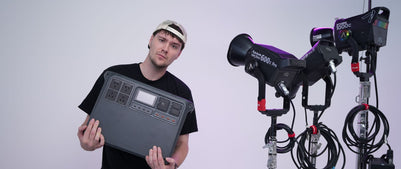
The End of the Generator? Hands-on with the DJI Power 2000
We’ve all been there: you’re on a remote shoot, beautiful location, but you’re either scrambling to find a power outlet or lugging a massive, noisy petrol generator through the bush. We’ve been...
View post
Why 2026 Might be the year to change from DSLR to Mirrorless
Alright—let’s do the DSLR vs mirrorless thing properly. Not “on paper”, not “in theory”, but head-to-head on the stuff that actually matters when you’re out shooting. My name's Oliver Minnett, I'm Georges...
View post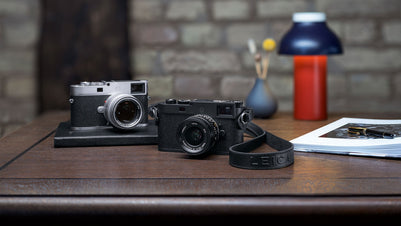
Leica is now at Georges Cameras
Some cameras don’t just document your life; they become part of it. I bought a Leica M6 in 2012. Photography had always been a part of my life; my dad had run...
View post
5 Things to Know Before You Upgrade Your Camera
Upgrading your camera? Learn the 5 things that matter: sensor size, ergonomics, lenses, power/media, and colour/screens—so you can choose the right camera with confidence.
View post


