


-v1665700116905.png?500x500&options=w_150)















Blackmagic Design Fairlight Console Channel Fader
Blackmagic Design Fairlight Console Channel Fader
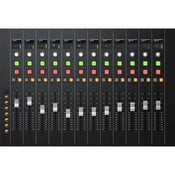
With the Blackmagic Design Fairlight Console Channel Fader modular control surface at your fingertips, you can mix and automate your DaVinci Resolve 17 sessions with a fluid, hands-on workflow that helps you finish projects faster and more intuitively. It boasts 12 full-featured channels, each with a touch-sensitive motorized fader, a customizable pan knob, a crisp LCD screen, and more.
Below the LCDs and pan knobs, every channel has its own set of illuminated buttons for quick execution of solo, mute, call, and automation. Further enhancing your efficiency are the buttons to the left of the channels; these let you map tracks and buses to the faders. Ethernet connectivity and software configuration via USB Type-C ensure a straightforward setup.
Hands-On Workflow
The Fairlight Console Channel Fader gives you full mixing and automation control for your DaVinci Resolve 17 system.
Tactile Controls per Channel
Each of the 12 channels features a touch-sensitive 100mm belt-driven motorized fader, a customizable soft knob for panning, and buttons for solo, mute, call, and automation. Use the solo and mute buttons to quickly isolate tracks or temporarily turn them off. Call buttons can be used to load track parameters, set up fader banks, and spill bus tracks to adjoining faders. Auto buttons enable automation.
High-Quality Faders
The faders are sculpted and weighted for comfort and feature smooth-gliding high-precision motors that provide the sensitivity and feedback you need for the most sophisticated mixing sessions. Bank control buttons switch and control 12 banks of 12 faders plus an additional 12 banks of user-defined channels. Assigned faders can also adjust send and record levels.
Multifunction Pan Knobs
The multifunction pan knob features tap-to-reset functionality and can be used for panning or assigned to control other parameters. The pan knob is rotary encoder based, which means it won't introduce unwanted noise like mechanical knobs.
Crisp LCD Screens
The integrated high-resolution LCD screens located above each fader strip let you see track colour, name and number, along with pan status, level meters, and more. This information correlates directly with the track headers and mixer in the software.
Bank Buttons
The Fairlight Console Channel Fader also provides automation controls and bank buttons for mapping tracks and buses to the faders. The six bank and control buttons on the left side of the panel let you quickly switch your faders to work on 12 different sets of sequentially mapped channels. You can also manually map an additional 12 banks of channel faders for each fader panel.
Easy Connectivity
The 10/100/1000 Base-T Ethernet port allows simple integration with your DaVinci Resolve 17 system. Additionally, a USB Type-C port is provided for software configuration (via Fairlight Studio and Console setup utility) and software updates.
Convenient Software Upgrades
The Fairlight Console Channel Fader utilizes an internal software upgrade function via an updater application.
Internal Power Supply
Equipped with an internal power supply, the Fairlight Console Channel Fader bypasses the need for an unsightly and cumbersome wall wart.
Price Match
Fill out the price match form below, and we will be in touch shortly.
Price Match
Fill out the price match form below, and we will be in touch shortly.
 If you'd like to know when it's due, we're here to help!
 Call us during business hours at 02 9299 0177.
 Chat live with our team on-site.
 Or email us anytime at info@georges.com.au with the subject "Awaiting Arrival"
Checking availability...
Product Overview
Blackmagic Design Fairlight Console Channel Fader
With the Blackmagic Design Fairlight Console Channel Fader modular control surface at your fingertips, you can mix and automate your DaVinci Resolve 17 sessions with a fluid, hands-on workflow that helps you finish projects faster and more intuitively. It boasts 12 full-featured channels, each with a touch-sensitive motorized fader, a customizable pan knob, a crisp LCD screen, and more.

Need advice?
Speak to one of our dedicated Australian-based sales team members.
Price Match
Fill out the price match form below, and we will be in touch shortly.
Price Match
Fill out the price match form below, and we will be in touch shortly.
Product Reviews
Blog posts

Beauty Lighting: How to Combine Hard and Soft Light to Make S...
A working beauty photographer’s guide to combining hard and soft light, beauty dish vs softbox, grids, negative fill and a clamshell setup you can copy, for skin that pops.
View post
Everyone Can Take a Picture. Not Everyone Can Hold the Room
What an agent, a Vogue visuals producer and a brand-side creative lead really look for in photographers now. There is a point in almost every creative career where the work alone stops...
View post
Beyond Reach: My Experience With the Fujifilm XF400mmF4.5 Sup...
Explore our hands-on experience with the Fujifilm XF400mmF4.5, covering its sharpness, autofocus, reach and performance for sport, wildlife, landscapes and portraits.
View post
Learn to Get the Shot Right In-Camera
Beauty photography tips from Oliver Minnett’s Georges workshop, covering lighting, direction, working with a creative team, and using Sony and Profoto gear.
View post
Stop Trying to Learn Everything at Once
Beauty photography tips from Oliver Minnett’s Georges workshop, covering lighting, direction, working with a creative team, and using Sony and Profoto gear.
View post
Beauty Photography Tips: Three Things I Wish I Knew Earlier
Beauty photography tips from Oliver Minnett’s Georges workshop, covering lighting, direction, working with a creative team, and using Sony and Profoto gear.
View post
How We Lit Karla Spetic's Australian Fashion Week Show with P...
We were invited by Karla Spetic to help light her runway, we chose Profoto's new LED lights for the job!
View post
Sony A7R VI First Thoughts: A Portrait Photographer’s Take on...
Sony has just launched the new Sony A7R VI, the latest camera in its high-resolution Alpha line, and I was lucky enough to spend some time with it earlier this week. I...
View post
Mobile Podcasting Setups Explained: From First Rig to Full Pr...
Mobile podcasting isn’t about shortcuts. It’s about picking gear that actually works, in the places podcasts actually happen. I used to chase the “best” setup. Turns out, the best setup is the...
View post
Rigging Up Your Sony Cinema Camera
Rigging gets a bad rap because a lot of rigs are built backwards. People buy parts first, bolt everything on, and end up with a camera that looks serious but shoots worse....
View post


