
















-v1665700116905.png?500x500&options=w_150)




















































































































Roland V-1HD Portable 4 x HDMI Input Switcher
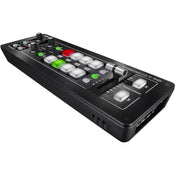
Roland's V-1HD 4 x HDMI Input Switcher is a portable solution for HD video production that accommodates up to four HD inputs. The inputs each have a frame buffer/TBC so you don't need to genlock your input sources together. You can control the switcher manually by using the built-in controls, or connect it to a computer or iPad running optional software for electronic control. Select your working resolution and switch between your four input sources. Built into the switcher is a 12-channel audio mixer which can de-embed and embed audio signals from HDMI.
The integrated T-fader allows you to manually control the speed of transitions, or you can use the take button to actuate your selected transition. The unit features a program and multiview preview output, as well as an analog audio input and output. Though small in size, it allows you to perform picture-in-picture, green screen, and other keying effects, while a transform control enables advanced video effects on your footage.
HD Switcher
This portable HD switcher supports four inputs of HD video, allowing you to select 1080i, 1080p, or 720p as your input source. Each input incorporates a frame buffer/TBC that allows you to use non-genlocked cameras, as well as play-out devices as video sources. You select the broadcast system (59.94/50 Hz) within the menu. The format selector switch is a global switch that affects the input and output format. However, with the switch in either of the 1080 options, the V-1HD enables input of both 1080i and 1080p signals.
Audio Mixer
The built-in 12-channel audio mixer allows you to de-embed audio from the HDMI stream, mix, and re-embed the audio into your output stream. The audio mixer is accessed by a connected PC running the available software.
Output Modes
The V-1HD features two HDMI outputs—one output always shows your switched program output, while the other (preview) can be switched between program output and multiview of your four sources.
Control Buttons
The soft rubber backlit buttons allow you to easily see the condition of your switcher, even in dim lighting conditions.
- Red: Indicates the current source being output
- Green: Indicates the video source that will be output on the next transition
Transitions
There are three buttons for applying transition effects: Cut, Mix (4 types), and Wipe (30 types).
Beat-per-Minute Sync
By using the T-fader bar and the BP-Sync button, you can deliver visuals synced to a music performance.
Memory
The Memory button allows you to save or recall up to eight presets, and the Freeze button can temporarily pause the incoming video.
Transformer Buttons
These buttons can be used to switch your video instantly or for applying effects.
Transitions
The T-bar lets you control the speed of your selected transitions.
Keying
The keying functionality permits picture-in-picture as well as green screen keying and graphics keying.
Output Fade
You can select to fade your output video to either black or white.
Effects
- Picture-in-picture and split screen functions
- Supports chroma and luminance key
- Two separate bus effects knobs allow you to apply affects independently to each bus
- Nine types of filter effects are available including silhouette, colorpass, negative, and findedge
Audio Effects
- EQ
- Delay
- Compressor
- HPF
- Gate
- Reverb
- Mastering effect
Control
Remote control is possible with the V-1HD RCS dedicated computer software for Mac OS X and Windows, or the V-1HD Remote iPad app connected via a USB cable. The application offers a detailed view of the connected V-1HD and can be used to switch video, mix audio, or change settings. You can control the unit from a music instrument or a sequencer via the MIDI input connector via MIDI. The V-1HD also transmits MIDI over USB and its controls can be mapped to popular visual performance software applications. Please use the Lightning to USB Camera Adapter to connect an iPad to the V-1HD.
HDCP
HDCP compliance can be enabled within the menu.
Price Match
Fill out the price match form below, and we will be in touch shortly.
Price Match
Fill out the price match form below, and we will be in touch shortly.
 If you'd like to know when it's due, we're here to help!
 Call us during business hours at 02 9299 0177.
 Chat live with our team on-site.
 Or email us anytime at info@georges.com.au with the subject "Awaiting Arrival"
Checking availability...
Product Overview
Roland's V-1HD 4 x HDMI Input Switcher is a portable solution for HD video production that accommodates up to four HD inputs. The inputs each have a frame buffer/TBC so you don't need to genlock your input sources together. You can control the switcher manually by using the built-in controls, or connect it to a computer or iPad running optional software for electronic control. Select your working resolution and switch between your four input sources. Built into the switcher is a 12-channel audio mixer which can de-embed and embed audio signals from HDMI.
The integrated T-fader allows you to manually control the speed of transitions, or you can use the take button to actuate your selected transition. The unit features a program and multiview preview output, as well as an analog audio input and output. Though small in size, it allows you to perform picture-in-picture, green screen, and other keying effects, while a transform control enables advanced video effects on your footage.

Need advice?
Speak to one of our dedicated Australian-based sales team members.
Price Match
Fill out the price match form below, and we will be in touch shortly.
Price Match
Fill out the price match form below, and we will be in touch shortly.
Product Reviews
Blog posts

Beauty Lighting: How to Combine Hard and Soft Light to Make S...
A working beauty photographer’s guide to combining hard and soft light, beauty dish vs softbox, grids, negative fill and a clamshell setup you can copy, for skin that pops.
View post
Everyone Can Take a Picture. Not Everyone Can Hold the Room
What an agent, a Vogue visuals producer and a brand-side creative lead really look for in photographers now. There is a point in almost every creative career where the work alone stops...
View post
Beyond Reach: My Experience With the Fujifilm XF400mmF4.5 Sup...
Explore our hands-on experience with the Fujifilm XF400mmF4.5, covering its sharpness, autofocus, reach and performance for sport, wildlife, landscapes and portraits.
View post
Learn to Get the Shot Right In-Camera
Beauty photography tips from Oliver Minnett’s Georges workshop, covering lighting, direction, working with a creative team, and using Sony and Profoto gear.
View post
Stop Trying to Learn Everything at Once
Beauty photography tips from Oliver Minnett’s Georges workshop, covering lighting, direction, working with a creative team, and using Sony and Profoto gear.
View post
Beauty Photography Tips: Three Things I Wish I Knew Earlier
Beauty photography tips from Oliver Minnett’s Georges workshop, covering lighting, direction, working with a creative team, and using Sony and Profoto gear.
View post
How We Lit Karla Spetic's Australian Fashion Week Show with P...
We were invited by Karla Spetic to help light her runway, we chose Profoto's new LED lights for the job!
View post
Sony A7R VI First Thoughts: A Portrait Photographer’s Take on...
Sony has just launched the new Sony A7R VI, the latest camera in its high-resolution Alpha line, and I was lucky enough to spend some time with it earlier this week. I...
View post
Mobile Podcasting Setups Explained: From First Rig to Full Pr...
Mobile podcasting isn’t about shortcuts. It’s about picking gear that actually works, in the places podcasts actually happen. I used to chase the “best” setup. Turns out, the best setup is the...
View post
Rigging Up Your Sony Cinema Camera
Rigging gets a bad rap because a lot of rigs are built backwards. People buy parts first, bolt everything on, and end up with a camera that looks serious but shoots worse....
View post


