
















-v1665700116905.png?500x500&options=w_150)




















































































































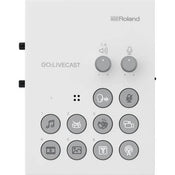
Roland Hardware/App Combo For Advanced Streaming With Smartphone
Roland Hardware/App Combo For Advanced Streaming With Smartphone
Pro Production for Smartphone Livestreaming
Although it’s easy to stream live content with your smartphone, making your broadcasts look professional takes more effort. That’s why you need to GO: live cast, the simple and affordable way to bring superior production values to your webcasting. This hardware/app combo is a fully-featured streaming studio that lets you mix sound, display titles, play media, trigger sound effects, and more—without needing a computer or costly dedicated A/V gear. With just the GO: LIVECAST hardware, companion app, and your smartphone, you have all the tools you need to present engaging live web shows that will rival the most advanced creators on social media.
Features:
A complete pro production studio for webcasting with a smartphone or tablet.
Compatible with Twitch, Facebook Live, YouTube, and other major streaming platforms.
Integrated system combining a compact desktop hardware interface with an interactive app.
Control smartphone cameras, trigger media, and adjust levels as you stream with intuitive, hands-on controls.
Large, customizable media libraries for onscreen titles, music, videos, photos, and sound effects.
Three microphone input options for great vocal sound: onboard microphone with reverb effect, plus XLR input with phantom power and combo jack for using the microphone on your headphones.
Headphones jack for sound monitoring.
Line input for connecting a musical instrument, mixer, or another external audio device.
Check viewer comments directly in the app while streaming.
Skin filter, in-camera mirroring, automatic portrait/landscape switching, and more.
Add a second smartphone camera via wi-fi and switch camera views with the hardware or app.
With Version 1.10 of the GO: LIVECAST app, gamers can now stream sound and live images from a second smartphone via its screen recording function (visit the Support tab for device compatibility).
Plug-and-Play Setup
Using GO: LIVECAST is quick and easy—just plug in your smartphone and connect earbuds or headphones for sound monitoring. A built-in mic is ready to capture high-quality sound, complete with onboard reverb if you like to sing. An external professional mic is also supported via the XLR input, and there’s even a stereo line input for plugging in a guitar preamp, synth, mixer, or another sound source.
Add Your Content to Your Livestream
The GO: LIVECAST app includes easy-to-use media tools that bring premium production values to your web shows. Create your own personalized libraries for music, sound effects, photos, and videos, or start creating with a variety of pre-installed options. Custom titles and text are also available, enhancing your productions even further. Media elements for different shows can be stored in Live Sets, all queued up and ready for when it’s time to go live.
Direct Connection with Streaming Platforms
The GO: LIVECAST app logs in to your accounts on Facebook Live, Twitch, YouTube, and other major streaming services.* Just select a platform and tap to start webcasting! And as you Livestream, comments from your viewers can be monitored via a scrolling window in the app.
A Mini Broadcast Studio at Your Fingertips
Via a simple, customizable control layout, the GO: LIVECAST hardware lets you direct your live presentations and stay fully engaged with your audience. All it takes is a touch to start broadcasting, play music, display titles, launch photos and videos—or even trigger some applause at the end of the show! Knobs provide quick control of mic and media volumes, while the mic-mute button will keep coughs and unwanted sounds out of your Livestream.
Get the Best Out of Your Smartphone Camera
Select your smartphone’s front or rear camera within the app and add a skin filter, if needed, to soften the look. Portrait or landscape mode is automatically set by your phone’s positioning, while in-camera mirroring displays the proper left/right perspective to your audience. It’s even possible to connect a second smartphone camera over wi-fi, with one-touch switching and support for split-screen views. Version 1.10* of the GO: LIVECAST app supports streaming sound and images from a second phone via its screen record function. This allows gamers to stream live feeds from the second phone while overlaying picture-in-picture from its front-facing camera.
Price Match
Fill out the price match form below, and we will be in touch shortly.
Price Match
Fill out the price match form below, and we will be in touch shortly.
 If you'd like to know when it's due, we're here to help!
 Call us during business hours at 02 9299 0177.
 Chat live with our team on-site.
 Or email us anytime at info@georges.com.au with the subject "Awaiting Arrival"
Checking availability...
Product Overview
Roland Hardware/App Combo For Advanced Streaming With Smartphone
Pro Production for Smartphone Livestreaming
Although it’s easy to stream live content with your smartphone, making your broadcasts look professional takes more effort. That’s why you need to GO: live cast, the simple and affordable way to bring superior production values to your webcasting. This hardware/app combo is a fully-featured streaming studio that lets you mix sound, display titles, play media, trigger sound effects, and more—without needing a computer or costly dedicated A/V gear. With just the GO: LIVECAST hardware, companion app, and your smartphone, you have all the tools you need to present engaging live web shows that will rival the most advanced creators on social media.

Need advice?
Speak to one of our dedicated Australian-based sales team members.
Price Match
Fill out the price match form below, and we will be in touch shortly.
Price Match
Fill out the price match form below, and we will be in touch shortly.
Product Reviews
Blog posts
Beauty Lighting: How to Combine Hard and Soft Light to Make S...
A working beauty photographer’s guide to combining hard and soft light, beauty dish vs softbox, grids, negative fill and a clamshell setup you can copy, for skin that pops.
View post
Everyone Can Take a Picture. Not Everyone Can Hold the Room
What an agent, a Vogue visuals producer and a brand-side creative lead really look for in photographers now. There is a point in almost every creative career where the work alone stops...
View post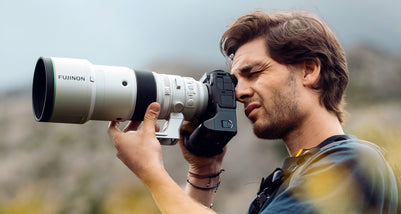
Beyond Reach: My Experience With the Fujifilm XF400mmF4.5 Sup...
Explore our hands-on experience with the Fujifilm XF400mmF4.5, covering its sharpness, autofocus, reach and performance for sport, wildlife, landscapes and portraits.
View post
Learn to Get the Shot Right In-Camera
Beauty photography tips from Oliver Minnett’s Georges workshop, covering lighting, direction, working with a creative team, and using Sony and Profoto gear.
View post
Stop Trying to Learn Everything at Once
Beauty photography tips from Oliver Minnett’s Georges workshop, covering lighting, direction, working with a creative team, and using Sony and Profoto gear.
View post
Beauty Photography Tips: Three Things I Wish I Knew Earlier
Beauty photography tips from Oliver Minnett’s Georges workshop, covering lighting, direction, working with a creative team, and using Sony and Profoto gear.
View post
How We Lit Karla Spetic's Australian Fashion Week Show with P...
We were invited by Karla Spetic to help light her runway, we chose Profoto's new LED lights for the job!
View post
Sony A7R VI First Thoughts: A Portrait Photographer’s Take on...
Sony has just launched the new Sony A7R VI, the latest camera in its high-resolution Alpha line, and I was lucky enough to spend some time with it earlier this week. I...
View post
Mobile Podcasting Setups Explained: From First Rig to Full Pr...
Mobile podcasting isn’t about shortcuts. It’s about picking gear that actually works, in the places podcasts actually happen. I used to chase the “best” setup. Turns out, the best setup is the...
View post
Rigging Up Your Sony Cinema Camera
Rigging gets a bad rap because a lot of rigs are built backwards. People buy parts first, bolt everything on, and end up with a camera that looks serious but shoots worse....
View post


