
















-v1665700116905.png?500x500&options=w_150)




















































































































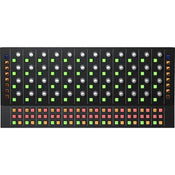
Blackmagic Design Fairlight Console Channel Control
Blackmagic Design Fairlight Console Channel Control
Expand hands-on control of your DaVinci Resolve 17 system with the Blackmagic Design Fairlight Console Channel Control, a modular control surface designed to work in tandem with a Fairlight Console Channel Fader (available separately) to provide 12 groups of touch-sensitive knobs and illuminated buttons that can be used to manipulate individual channels, all parameters of a single track, or parameters of the master buses.
The in-line channel mode configures the controls into 12 traditional channels, an ideal way to operate live recording sessions. Single-channel mode is optimal for intense channel-by-channel mixing as it utilizes all 12 groups of controls to access up to 192 parameters for a selected track. Switch to the master channel mode when mixing and mastering soundtracks; the 12 groups of controls are assigned to the master buses and organized in order of processing.
Hands-On Workflow
This module features 12 groups of touch-sensitive rotary encoder knobs (four knobs per group) and illuminated buttons (10 buttons per group), each of which can be assigned to a single channel, the 12 adjacent fader channels, or the master bus. When used in single-channel mode, you get instant access to over 192 different parameters for the current selection. That means you don't have to take your hands off the panel or use the mouse to adjust EQ, dynamics, and other settings.
Your selections control the LCD monitor (available separately), so you have a precise display of your changes as you make them. Channel display buttons on the sides let you select the channel display mode, while buttons at the bottom let you set Insert In, Solo Safe, Select, and Arm for the active channel.
In-Line Channel Control Mode
In-line channel control mode splits the knobs and buttons into 12 groups that line up vertically with the 12-fader Fairlight Console Channel Fader (available separately). This mode is perfect during live recording sessions because it allows you to easily see and control the parameters of multiple microphone inputs simultaneously.
Single Channel Control Mode
Single-channel control mode assigns all 12 groups of controls to a single channel, giving you instant access to 192 parameters for the selected track. This is the most common mode used in audio postproduction, as it provides quick access to all controls for a specific track.
Master Channel Control Mode
Master channel control mode utilizes all channel controls to adjust parameters for the master buses. The controls in master mode are organized from left to right in order of processing. Master mode is commonly used for mixing and mastering soundtracks.
Easy Connectivity
The 10/100/1000 Base-T Ethernet port allows simple integration with your DaVinci Resolve 17 system. Additionally, a USB Type-C port is provided for software configuration (via Fairlight Studio and Console setup utility) and software updates.
Convenient Software Upgrades
The Fairlight Console Channel Control utilizes an internal software upgrade function via an updater application.
Internal Power Supply
Equipped with an internal power supply, the Fairlight Console Channel Control bypasses the need for an unsightly and cumbersome wall wart.
Price Match
Fill out the price match form below, and we will be in touch shortly.
Price Match
Fill out the price match form below, and we will be in touch shortly.
 If you'd like to know when it's due, we're here to help!
 Call us during business hours at 02 9299 0177.
 Chat live with our team on-site.
 Or email us anytime at info@georges.com.au with the subject "Awaiting Arrival"
Checking availability...
Product Overview
Blackmagic Design Fairlight Console Channel Control
Expand hands-on control of your DaVinci Resolve 17 system with the Blackmagic Design Fairlight Console Channel Control, a modular control surface designed to work in tandem with a Fairlight Console Channel Fader (available separately) to provide 12 groups of touch-sensitive knobs and illuminated buttons that can be used to manipulate individual channels, all parameters of a single track, or parameters of the master buses.

Need advice?
Speak to one of our dedicated Australian-based sales team members.
Price Match
Fill out the price match form below, and we will be in touch shortly.
Price Match
Fill out the price match form below, and we will be in touch shortly.
Product Reviews
Blog posts

Beauty Lighting: How to Combine Hard and Soft Light to Make S...
A working beauty photographer’s guide to combining hard and soft light, beauty dish vs softbox, grids, negative fill and a clamshell setup you can copy, for skin that pops.
View post
Everyone Can Take a Picture. Not Everyone Can Hold the Room
What an agent, a Vogue visuals producer and a brand-side creative lead really look for in photographers now. There is a point in almost every creative career where the work alone stops...
View post
Beyond Reach: My Experience With the Fujifilm XF400mmF4.5 Sup...
Explore our hands-on experience with the Fujifilm XF400mmF4.5, covering its sharpness, autofocus, reach and performance for sport, wildlife, landscapes and portraits.
View post
Learn to Get the Shot Right In-Camera
Beauty photography tips from Oliver Minnett’s Georges workshop, covering lighting, direction, working with a creative team, and using Sony and Profoto gear.
View post
Stop Trying to Learn Everything at Once
Beauty photography tips from Oliver Minnett’s Georges workshop, covering lighting, direction, working with a creative team, and using Sony and Profoto gear.
View post
Beauty Photography Tips: Three Things I Wish I Knew Earlier
Beauty photography tips from Oliver Minnett’s Georges workshop, covering lighting, direction, working with a creative team, and using Sony and Profoto gear.
View post
How We Lit Karla Spetic's Australian Fashion Week Show with P...
We were invited by Karla Spetic to help light her runway, we chose Profoto's new LED lights for the job!
View post
Sony A7R VI First Thoughts: A Portrait Photographer’s Take on...
Sony has just launched the new Sony A7R VI, the latest camera in its high-resolution Alpha line, and I was lucky enough to spend some time with it earlier this week. I...
View post
Mobile Podcasting Setups Explained: From First Rig to Full Pr...
Mobile podcasting isn’t about shortcuts. It’s about picking gear that actually works, in the places podcasts actually happen. I used to chase the “best” setup. Turns out, the best setup is the...
View post
Rigging Up Your Sony Cinema Camera
Rigging gets a bad rap because a lot of rigs are built backwards. People buy parts first, bolt everything on, and end up with a camera that looks serious but shoots worse....
View post


