
















-v1665700116905.png?500x500&options=w_150)




















































































































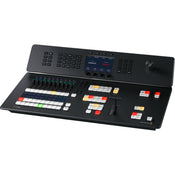
Blackmagic Design ATEM Television Studio 4K8
Blackmagic Design ATEM Television Studio 4K8
Add an all-in-one live streaming switcher to your television studio, remote production, or live venue with the ATEM Television Studio 4K8 from Blackmagic Design. This compact, redesigned live TV switcher is a great fit to any streaming production, providing eight 12G-SDI inputs that support up to UHD 4K60 video, built-in live streaming, USB webcam support, a 58-channel audio mixer, chroma keyers, DVE, transitions, media players, internal recording, and talkback support. The switcher is also compatible with the Blackmagic Cloud, so your program recordings can be available immediately from anywhere around the globe.
Live Production
You get an incredibly powerful 8-input switcher with both program and 10 aux outputs, so you have everything you need for mobile production. That means you can connect up to 8 sources. Plus, you get professional camera control, talkback, and audio mixing, all designed into a familiar broadcast panel.
Distribution
With a built-in hardware streaming engine, you can live stream your event to a global audience. Recording to H.264 files with AAC audio means you get the correct format to upload to YouTube. Plus, you share live broadcasts with your audience by using the aux outputs and large screens and projectors.
Production Switcher Control
You get an advanced broadcast-grade switcher, with built-in ATEM Advanced Chroma Keyers, Fairlight audio mixer, DVE, still store for graphics, and more. Most of the features can be operated from the front panel, or you can use the free ATEM Software Control on macOS or Windows to access even more features.
Easy Setup and Usage
Simply press any of the program row buttons on the front panel to cut between video sources. Or you can pre-select a source on the preview row and then choose between cut or effect transitions by selecting the cut or auto buttons. You can select from exciting transitions, such as dissolve, or more dramatic effects, such as dip to colour, DVE squeeze, and DVE push. You can even add a DVE for picture-in-picture effects with customised graphics. There are also media players, which let you store graphics with alpha channels for titles and graphics that you can load as live video inputs. Then, you can live stream the results.
Redesigned Front Panel
The front panel includes buttons for selecting sources, triggering transitions, and setting up video effects. Plus, the buttons are the same high-end type used on expensive broadcast switchers. You also get a built-in T-bar for manual transition control and a three-axis joystick. The front panel even has an innovative audio mixer-control area with live metreing on a dedicated LCD. There are also buttons for recording and streaming control, plus live aux switching that lets you change aux outputs between all 8 cameras, program, preview, or the multiview.
Broadcast-Style Mix/Effects Switching
ATEM Television Studio uses a professional program/preview style of operation, which is exactly the way large broadcasters use live production switchers. However, ATEM Television Studio can be switched to A/B style switching, which is easier when it's used by volunteers or community groups. However, if you want to operate the switcher like a broadcast professional, then the program/preview is perfect. This means a source won't be put on air until you press the cut or auto button. This two-step process means you see what you are selecting before putting it to air, so you get fewer mistakes.
Add Exciting Video Effects
One of the benefits of ATEM Television Studio is the range of professional built-in video effects. The cut button ensures an instant cut when switching between sources. The T-bar fader can be used to transition video effects, or you can do the transition automatically by pressing the auto button. Auto uses the transition duration set in the system control. You can also select the type of effect you want, including mix, which does a smooth transition between sources, or dip which transitions via a third video source, such as a colour generator. There is a wide range of SMPTE wipes included, plus DVE effects that slide or squeeze the image off screen when transitioning between video sources.
Creative Transitions
ATEM Television Studio includes the same kind of transitions found on expensive broadcast switchers. This means the effects and transitions can be customised in many different ways, so they are surprisingly powerful. You'll never stop finding new ways of using them. That's because all transitions can be customised by adjusting parametres such as duration, border colour, border width, position, and direction. You can even use the DVE with a wipe transition, where the DVE moves a graphic over the wipe edge. That's called a graphic wipe and it's often used in sports broadcasting. The preview transition button can be used to set up effects offline, which is great for eliminating mistakes.
Built-In DVE
ATEM Television Studio HD features an independent DVE that lets you reposition graphics and create picture-in-picture compositions. You get amazing quality and the DVE supports position, resize, and scale, all in real time. The DVE lets you create professional picture-in-picture effects with customisable 3D borders, shadows, and lighting. DVEs can also be used to create amazing DVE transitions with squeeze, swoosh, and push effects for adding excitement to your programming. You can even combine DVE transitions with custom graphics to create your own graphic wipe transitions. Plus, there is also a SuperSource multilayer processing engine with 4 extra DVEs.
Supports Internal Media
The built-in media pool stores broadcast-quality graphics and animations that can be played back using the built-in media players. Media players appear as independent sources, so you don't need to waste any of the SDI inputs for graphics. For highest quality, all media supports RGB colourspace with alpha channel, allowing transparency and layering. The media pool can hold 20 HD resolution stills. Motion graphics clips for animations and stingers can be up to 720 frames in 720HD, 360 frames in 1080HD, and 90 frames in UHD 4K. The ATEM Software Control allows you to upload and manage media. You can even prepare graphics in Adobe Photoshop and then download to the media pool using the free ATEM Photoshop plug-in.
SuperSource Processing
In addition to the DVE in the ATEM Television Studio, there is also a powerful SuperSource multilayer processor. SuperSource gives you 4 extra DVE layers plus a background layer, all layered together as an additional input source. Any video input can be used as sources for each DVE, then it's all layered together over a media pool custom background or live video. SuperSource is perfect for doing multiple picture-in-picture displays with people being interviewed because you can set up the effect, so the viewer can see each person being interviewed, all within a stylish graphic. SuperSource is just like having a completely independent multi-layer VFX switcher built in.
8 Standards-Converted 12G-SDI Inputs
The ATEM Television Studio HD features 8 independent 12G-SDI inputs, with each input featuring its own dedicated standards converter. That means it's possible to convert any input source to the HD or UHD video standard of the switcher. You could have each switcher's SDI input running a different television standard and all the inputs would just work.
SDI input audio channels 1, 2, 3, and 4 can also be manually routed to various embedded audio channels in the program and aux outputs. Plus, you can even router out audio channels 1 and 2 from the SDI inputs to the MADI digital audio output, so you can hand off the switcher input audio to an external audio engineer for mixing.
12G-SDI Outputs with 16-Channel Embedded Audio
The ATEM Television Studio includes twelve 12G-SDI program outputs, so you get enough connections to send a separate program return feed to all of your cameras. That's important because the SDI program return is used to send tally, talkback, and control information back to the cameras.
You also get two dedicated aux outputs for driving stage monitors and master recorders. These aux outputs can be live-switched using dedicated buttons on the control panel. Aux 1 even includes an onscreen counter for presenter monitoring. Plus, you can manually route audio into all 16 embedded audio channels in the SDI outputs. For camera monitoring, there is a dedicated 12G-SDI and HDMI 2.0 output for the multiview.
16-Source Multiview on a Single Monitor
When doing larger live productions with multiple cameras, it's vital to see all your video sources at the same time on a single monitor. ATEM Television Studio HD includes a professional multiview that lets you see all video inputs, preview, and program on a single SDI or HDMI monitor. You can even send the multiview to the aux outputs. Each camera view includes tally indicators, so you know when each source is on air, plus each view has custom labels and audio metres. You can fully customise the multiview layout with up to 16 simultaneous views. You can also select one of the additional status views that lets you track recording, streaming, and the audio mixer status, right from the multiview.
Add Audio Expansion for More Microphones
If you're building a podcasting studio or you need more microphones, then the ATEM Microphone Converter allows audio input expansion. It connects to the ATEM Television Studio using the MADI port, so there's no complex setup and you can daisy-chain units to add more inputs. Each converter has 4 analog inputs that are mic/line selectable and have phantom power.
The design features amazing quality with an extremely low noise floor of -129 dBV, a dynamic range of 131 dB(A), low distortion of 0.002%, and uniform tolerances across all channels. It even uses 8 separate ADCs on each input to collectively extend the dynamic range. Plus, it has a fun HDMI monitoring output with scrolling audio waveforms.
Record Direct to Internal Cloud Storage or USB Disks
ATEM Television Studio HD supports recording to external USB flash disks. Or if an optional M.2 flash disk is installed, you can record direct to internal cloud storage. The internal storage plus any external USB disks will be available to share over the local Ethernet network, so other people can work on postproduction tasks such as editing, colour correction, and graphics preparation.
All recordings are in H.264 format with AAC audio for broadcast-quality video and small file sizes. You can also connect multiple USB disks, so recording will continue if a disk becomes full. You even get buttons on the control panel to start recording, and you can see record status in the multiview.
Outputs to Any Software that Supports USB Webcams
You can use any video software with ATEM Television Studio HD because the USB connection will emulate a webcam. That means you can plug into a computer and use any video software that works with a webcam. The software is tricked into thinking the ATEM Television Studio HD is a common webcam, but it's really a live production switcher. That guarantees full compatibility with any video software and in full resolution 1080HD quality.
Imagine doing a presentation from a professional broadcast studio to software such as Zoom, Teams, or Skype. For streaming, the webcam output also works with streaming software such as Open Broadcaster, XSplit Broadcaster, and more.
Localised for 13 Popular Languages
ATEM Television Studio HD supports multiple languages in the menus and in the ATEM Software Control, so you can customise it to the language you prefer. You get support for English, Chinese, Japanese, Korean, Spanish, German, French, Russian, Italian, Portuguese, Turkish, Polish, and Ukrainian languages.
Simply go into the setup menu to change the language, or you can always switch to another language at any time in the future. Once a language is selected, the menus on all the LCDs will change to the selected language. Multiple language support means ATEM Television Studio HD is perfect for doing live production work anywhere in the world and with any crew.
Flexible and Redundant Power
The all-in-one design of ATEM Television Studio includes a built-in power supply, so you don't have to carry around an external power brick. Simply plug it into any AC mains outlet and start live production. The international power supply automatically works from 100 to 240 VAC, so you can use it anywhere in the world. Plus, ATEM Television Studio includes both AC and DC power connections.
A broadcast-standard XLR 12 VDC power connection is included, which is perfect for backup power or for running on batteries. That means you can use it in extremely remote locations. Plus, if the internal power supply should malfunction, then you can simply connect an external DC supply to keep running.
Designed to Be Easy to Repair
With so many features built in, it's vital that ATEM Television Studio can be easily repaired. Plus, there is already a lot of built-in redundancy, with 4 Ethernet connections, 12 program SDI outputs, 2 USB ports, and 2 power connections. However, if someone trips on a cable and breaks a connector, then you need to be able to repair the connector at low cost.
All the internal electronic PCBs are modular, so any qualified technician can buy a replacement and easily swap the board. This includes the connector PCBs, which can be purchased separately. All the technician needs to do is remove the bottom cover and replace the PCB. A large broadcaster could even buy the boards as a spare parts kit.
Key Features:
8-Input 12G-SDI Live Switcher
Supports UHD 4K60 Production
Redesigned Control Button Layout
USB and M.2 Recording Support
Blackmagic Cloud Integration Support
Webcam Output Compatibility
12G-SDI and HDMI Multiview Outputs
Built-In Audio Mixing Controls
Customisable Electronic LCD Displays
Studio Camera Control Support
Timecode, MADI and Talkback Support
What's in the Box:
Blackmagic Design ATEM Television Studio 4K8
Price Match
Fill out the price match form below, and we will be in touch shortly.
Price Match
Fill out the price match form below, and we will be in touch shortly.
 If you'd like to know when it's due, we're here to help!
 Call us during business hours at 02 9299 0177.
 Chat live with our team on-site.
 Or email us anytime at info@georges.com.au with the subject "Awaiting Arrival"
Checking availability...
Product Overview
Blackmagic Design ATEM Television Studio 4K8
Add an all-in-one live streaming switcher to your television studio, remote production, or live venue with the ATEM Television Studio 4K8 from Blackmagic Design. This compact, redesigned live TV switcher is a great fit to any streaming production, providing eight 12G-SDI inputs that support up to UHD 4K60 video, built-in live streaming, USB webcam support, a 58-channel audio mixer, chroma keyers, DVE, transitions, media players, internal recording, and talkback support. The switcher is also compatible with the Blackmagic Cloud, so your program recordings can be available immediately from anywhere around the globe.

Need advice?
Speak to one of our dedicated Australian-based sales team members.
Key Features
8-Input Broadcast Switching
Blackmagic Design ATEM Television Studio 4K8 enabling 8-input broadcast switching for flexible live production control.
Live Streaming & Recording
Blackmagic Design ATEM Television Studio 4K8 supporting live streaming and recording for multi-platform content delivery.
Studio-Grade Audio Control
Blackmagic Design ATEM Television Studio 4K8 equipped with professional studio-grade audio control for clear and balanced sound output.
Advanced Video Effects
Blackmagic Design ATEM Television Studio 4K8 featuring advanced video effects for dynamic and creative production control.
Comprehensive Multiview Monitoring
Blackmagic Design ATEM Television Studio 4K8 integrated with a comprehensive multiview monitoring system for real-time scene management.
Camera Control Integration
Blackmagic Design ATEM Television Studio 4K8 offering camera control integration for seamless multi-camera operation.
All-in-One Production Powerhouse
Blackmagic Design ATEM Television Studio 4K8
.jpg?v=1780392823166&transform=resize=492)

Professional Live Production Hub
An all-in-one system for switching, streaming, recording, audio mixing, and camera control, delivering seamless performance for professional live production workflows.

Built for Broadcast Excellence
Engineered for professional live production with advanced switching, streaming, recording, audio control, and monitoring tools for reliable broadcast-quality performance.
Price Match
Fill out the price match form below, and we will be in touch shortly.
Price Match
Fill out the price match form below, and we will be in touch shortly.
Product Reviews
Blog posts
Tamron 16-50mm F2.8 vs Sigma 18-50mm F2.8: Which Compact APS-...
If you shoot on an APS-C mirrorless camera and want one lens that stays on the body most of the time, there's a good chance the Sigma 18-50mm F2.8 DC DN Contemporary...
View post
The Ultimate Guide to PTZ Cameras: Choosing the Right Setup f...
Compare Canon, Sony, BirdDog and Telycam PTZ cameras on image quality, tracking, zoom and value. Find the right setup for your production at Georges Cameras.
View post
Beauty Lighting: How to Combine Hard and Soft Light to Make S...
A working beauty photographer’s guide to combining hard and soft light, beauty dish vs softbox, grids, negative fill and a clamshell setup you can copy, for skin that pops.
View post
Everyone Can Take a Picture. Not Everyone Can Hold the Room
What an agent, a Vogue visuals producer and a brand-side creative lead really look for in photographers now. There is a point in almost every creative career where the work alone stops...
View post
Beyond Reach: My Experience With the Fujifilm XF400mmF4.5 Sup...
Explore our hands-on experience with the Fujifilm XF400mmF4.5, covering its sharpness, autofocus, reach and performance for sport, wildlife, landscapes and portraits.
View post
Learn to Get the Shot Right In-Camera
Beauty photography tips from Oliver Minnett’s Georges workshop, covering lighting, direction, working with a creative team, and using Sony and Profoto gear.
View post
Stop Trying to Learn Everything at Once
Beauty photography tips from Oliver Minnett’s Georges workshop, covering lighting, direction, working with a creative team, and using Sony and Profoto gear.
View post
Beauty Photography Tips: Three Things I Wish I Knew Earlier
Beauty photography tips from Oliver Minnett’s Georges workshop, covering lighting, direction, working with a creative team, and using Sony and Profoto gear.
View post
How We Lit Karla Spetic's Australian Fashion Week Show with P...
We were invited by Karla Spetic to help light her runway, we chose Profoto's new LED lights for the job!
View post
Sony A7R VI First Thoughts: A Portrait Photographer’s Take on...
Sony has just launched the new Sony A7R VI, the latest camera in its high-resolution Alpha line, and I was lucky enough to spend some time with it earlier this week. I...
View post