















-v1665700116905.png?500x500&options=w_150)



















































































































Blackmagic Design ATEM Mini Extreme
Blackmagic Design ATEM Mini Extreme
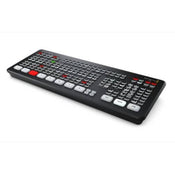
The Blackmagic Design ATEM Mini Extreme is an 8-input live production switcher for live streaming. It features an integrated control panel and has advanced broadcast features. In addition to live streaming using RTMP protocols, you can also output your program as if it was a webcam over USB. This versatile switcher's eight independent HDMI inputs accept all popular HD signals up to 1080p60. Each input has discrete frame rate and format converters, and it supports re-syncing for seamless switching between a variety of pro and consumer cameras, game consoles, and computer feeds.
Switch, add effects, color grade, and key in real time using the control surface's buttons, or via the software control panel. CCU functions are available for controlling Blackmagic Studio and URSA Mini/Broadcast/Micro Studio cameras from the switcher. The ATEM Mini Extreme supports up to nine layers, with four upstream and two downstream keyers, up to four chroma keyers, up to four linear keyers, two DVE with borders and drop shadow, five pattern generators, and two color generators. Designed for live streaming or webcam production, the Mini Extreme has HDMI outputs to feed monitors and supports up to 16-screen multiview.
Stream Live
Control Interface
Output
4G and 5G Phone Support
Multiview Monitoring
Camera Control
Media Pool
Compatibility
Recording
Video Effects
Audio
Broadcast Features
Price Match
Fill out the price match form below, and we will be in touch shortly.
Price Match
Fill out the price match form below, and we will be in touch shortly.
 If you'd like to know when it's due, we're here to help!
 Call us during business hours at 02 9299 0177.
 Chat live with our team on-site.
 Or email us anytime at info@georges.com.au with the subject "Awaiting Arrival"
Checking availability...
Product Overview
Blackmagic Design ATEM Mini Extreme

Need advice?
Speak to one of our dedicated Australian-based sales team members.
Price Match
Fill out the price match form below, and we will be in touch shortly.
Price Match
Fill out the price match form below, and we will be in touch shortly.
Product Reviews
Blog posts

Mobile Podcasting Setups Explained: From First Rig to Full Pr...
Mobile podcasting isn’t about shortcuts. It’s about picking gear that actually works, in the places podcasts actually happen. I used to chase the “best” setup. Turns out, the best setup is the...
View post
Rigging Up Your Sony Cinema Camera
Rigging gets a bad rap because a lot of rigs are built backwards. People buy parts first, bolt everything on, and end up with a camera that looks serious but shoots worse....
View post
What Makes a Good Photographer? A Portfolio Deconstruction
Clyde Vaughan Guest post by Clyde Vaughan — ahead of Clyde's talk on January 22: “How to create incredible images: A talk by Clyde Vaughan”. If you ask “what makes a good...
View post
The End of the Generator? Hands-on with the DJI Power 2000
We’ve all been there: you’re on a remote shoot, beautiful location, but you’re either scrambling to find a power outlet or lugging a massive, noisy petrol generator through the bush. We’ve been...
View post
Why 2026 Might be the year to change from DSLR to Mirrorless
Alright—let’s do the DSLR vs mirrorless thing properly. Not “on paper”, not “in theory”, but head-to-head on the stuff that actually matters when you’re out shooting. My name's Oliver Minnett, I'm Georges...
View post
Leica is now at Georges Cameras
Some cameras don’t just document your life; they become part of it. I bought a Leica M6 in 2012. Photography had always been a part of my life; my dad had run...
View post
5 Things to Know Before You Upgrade Your Camera
Upgrading your camera? Learn the 5 things that matter: sensor size, ergonomics, lenses, power/media, and colour/screens—so you can choose the right camera with confidence.
View post
Canon G7X Mark III vs Sony, Panasonic, Ricoh & Fujifilm: Best...
Looking beyond the Canon G7X Mark III? We compare the best compact cameras from Sony, Panasonic, Ricoh and Fujifilm to help you choose the right model for 2025.
View post
Couples Photography: Get Real Moments, Not Stiff Poses
Clyde Vaughan shares five great tips that consistently make couples shoots shoots feel easy and look incredible for Georges Cameras.
View post
Canon EOS R6 Mark III Review: First Impressions, Real-World P...
In this post, we review the new Canon EOS R6 Mark III Camera and the RF 45mm F1.2 STM Lens.
View post


