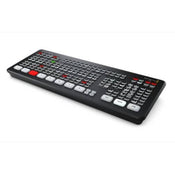
The Blackmagic Design ATEM Mini Extreme is an 8-input live production switcher for live streaming. It features an integrated control panel and has advanced broadcast features. In addition to live streaming using RTMP protocols, you can also output your program as if it was a webcam over USB. This versatile switcher's eight independent HDMI inputs accept all popular HD signals up to 1080p60. Each input has discrete frame rate and format converters, and it supports re-syncing for seamless switching between a variety of pro and consumer cameras, game consoles, and computer feeds.
Switch, add effects, color grade, and key in real time using the control surface's buttons, or via the software control panel. CCU functions are available for controlling Blackmagic Studio and URSA Mini/Broadcast/Micro Studio cameras from the switcher. The ATEM Mini Extreme supports up to nine layers, with four upstream and two downstream keyers, up to four chroma keyers, up to four linear keyers, two DVE with borders and drop shadow, five pattern generators, and two color generators. Designed for live streaming or webcam production, the Mini Extreme has HDMI outputs to feed monitors and supports up to 16-screen multiview.
Stream Live
Live stream to YouTube, Facebook Live, Skype, Twitch, Zoom, Microsoft Teams, and other platforms that support RTMP protocols.
Control Interface
The front panel includes easy-to-use buttons for selecting sources, video effects, and transitions. The source buttons are large, allowing you to operate them by feel. Included on the ATEM Extreme are buttons for audio mixing, recording, and streaming control, as well as output selection buttons that let you change the video output between cameras, program, and multiview. On the rear panel, there are HDMI connections for cameras or computers, extra microphone inputs, USB for webcam out, plus an HDMI "AUX" output for program video.
Output
You can output using the Ethernet connection to your network or use the USB Type-C output to have your switched show recognized as a webcam input by virtually any video software such as Zoom, Microsoft Teams, Skype, Open Broadcaster, XSplit Broadcaster, and others.
4G and 5G Phone Support
If you're doing live production on location, the ATEM Mini Extreme models support connecting an Apple or Android phone to the USB port to use mobile data. It's also a great backup for the main Ethernet connection, so you don't drop your stream if your hardwired connection gets interrupted. The switcher will automatically switch to using the phone as the primary connection, and the USB port will also power your phone, so the battery won't drain.
Multiview Monitoring
You can configure the HDMI output for multiview with 4, 7, 10, 13, up to 16 views including Program, Preview, eight HDMI inputs, SuperSource, clean feed, media player, streaming status, recording status, and audio meters.
Camera Control
The ATEM Mini Extreme can control the Blackmagic Pocket Cinema Camera 4K and 6K models when they are updated to the latest software and plugged in via the HDMI inputs. You can control your HDMI camera settings such as iris, gain, focus, detail, and zoom control on compatible lenses. Plus, you can color balance cameras, as well as create unique looks using the DaVinci Resolve primary color corrector built into the Blackmagic Pocket Cinema Camera 4K and 6K.
Media Pool
The switcher can store up to 20 images with fill and key, and it supports PNG, TGA, BMP, GIF, JPEG, and TIFF file formats.
Compatibility
It includes the ATEM Software Control Panel, and it is also compatible with the ATEM 1 M/E, ATEM 2 M/E, and ATEM 4 M/E Advanced Panels. The ATEM Mini Extreme can be configured using Blackmagic's Videohub Hardware Panel Setup utility to route sources to destinations using Videohub Smart Control Pro and Videohub Master Control Pro.
Recording
The ATEM Mini Extreme models support the direct recording of your streaming data to USB flash disks using the same H.264 video files with AAC audio that you streamed. Recording to multiple disks is also supported via a USB hub or the Blackmagic MultiDock, so when a disk becomes full, recording can continue to a second disk for nonstop recording. Record settings and disk selection are set up in ATEM Software Control, and there's a record status view in the built-in multiview. You can even trigger recording on connected Blackmagic Pocket Cinema Cameras.
Video Effects
One of the benefits of ATEM Mini is the professional production values possible using the range of built-in video effects. The cut button ensures an instant cut when switching between sources. The auto button is a professional term used on large broadcast switchers to enable video effect transitions. There are duration buttons for video effects allowing 0.5-, 1-, 1.5-, and 2-second settings. You can also select the type of effect you want including mix, which does a smooth transition between sources, and dip, which fades via a color during the transition. Or use fun DVE effects that move the image off-screen when transitioning between sources.
Audio
With two independent 3.5mm stereo audio inputs, you can connect desktop and lapel microphones, or you can connect a music player to generate introduction music after the live stream commences but before the program starts. With two extra stereo audio inputs, you can ensure a host and guest both have lapel microphones when doing interviews. All audio inputs to the ATEM Mini include buttons on the panel for adjusting audio level and enabling inputs into the audio mixer. All models feature a Fairlight audio mixer with all HDMI inputs, and both microphone inputs are connected to the audio mixer, so you can live mix from all audio sources. The ATEM Mini Extreme also adds a headphone output.
Broadcast Features
Hiding in the ATEM Mini Extreme models are a host of broadcast-caliber features that are accessible when connected to a Mac or Windows computer running the free ATEM Software Control app.
SKU: GC50-SWATEMMINICEXT
Blackmagic Design ATEM Mini Extreme
The Blackmagic Design ATEM Mini Extreme is an 8-input live production switcher for live streaming. It features an integrated control panel and has advanced broadcast features. In addition to live streaming using RTMP protocols, you can also output your program as if it was a webcam over USB. This versatile switcher's eight independent HDMI inputs accept all popular HD signals up to 1080p60. Each input has discrete frame rate and format converters, and it supports re-syncing for seamless switching between a variety of pro and consumer cameras, game consoles, and computer feeds.
Switch, add effects, color grade, and key in real time using the control surface's buttons, or via the software control panel. CCU functions are available for controlling Blackmagic Studio and URSA Mini/Broadcast/Micro Studio cameras from the switcher. The ATEM Mini Extreme supports up to nine layers, with four upstream and two downstream keyers, up to four chroma keyers, up to four linear keyers, two DVE with borders and drop shadow, five pattern generators, and two color generators. Designed for live streaming or webcam production, the Mini Extreme has HDMI outputs to feed monitors and supports up to 16-screen multiview.
Stream Live
Live stream to YouTube, Facebook Live, Skype, Twitch, Zoom, Microsoft Teams, and other platforms that support RTMP protocols.
Control Interface
The front panel includes easy-to-use buttons for selecting sources, video effects, and transitions. The source buttons are large, allowing you to operate them by feel. Included on the ATEM Extreme are buttons for audio mixing, recording, and streaming control, as well as output selection buttons that let you change the video output between cameras, program, and multiview. On the rear panel, there are HDMI connections for cameras or computers, extra microphone inputs, USB for webcam out, plus an HDMI "AUX" output for program video.
Output
You can output using the Ethernet connection to your network or use the USB Type-C output to have your switched show recognized as a webcam input by virtually any video software such as Zoom, Microsoft Teams, Skype, Open Broadcaster, XSplit Broadcaster, and others.
4G and 5G Phone Support
If you're doing live production on location, the ATEM Mini Extreme models support connecting an Apple or Android phone to the USB port to use mobile data. It's also a great backup for the main Ethernet connection, so you don't drop your stream if your hardwired connection gets interrupted. The switcher will automatically switch to using the phone as the primary connection, and the USB port will also power your phone, so the battery won't drain.
Multiview Monitoring
You can configure the HDMI output for multiview with 4, 7, 10, 13, up to 16 views including Program, Preview, eight HDMI inputs, SuperSource, clean feed, media player, streaming status, recording status, and audio meters.
Camera Control
The ATEM Mini Extreme can control the Blackmagic Pocket Cinema Camera 4K and 6K models when they are updated to the latest software and plugged in via the HDMI inputs. You can control your HDMI camera settings such as iris, gain, focus, detail, and zoom control on compatible lenses. Plus, you can color balance cameras, as well as create unique looks using the DaVinci Resolve primary color corrector built into the Blackmagic Pocket Cinema Camera 4K and 6K.
Media Pool
The switcher can store up to 20 images with fill and key, and it supports PNG, TGA, BMP, GIF, JPEG, and TIFF file formats.
Compatibility
It includes the ATEM Software Control Panel, and it is also compatible with the ATEM 1 M/E, ATEM 2 M/E, and ATEM 4 M/E Advanced Panels. The ATEM Mini Extreme can be configured using Blackmagic's Videohub Hardware Panel Setup utility to route sources to destinations using Videohub Smart Control Pro and Videohub Master Control Pro.
Recording
The ATEM Mini Extreme models support the direct recording of your streaming data to USB flash disks using the same H.264 video files with AAC audio that you streamed. Recording to multiple disks is also supported via a USB hub or the Blackmagic MultiDock, so when a disk becomes full, recording can continue to a second disk for nonstop recording. Record settings and disk selection are set up in ATEM Software Control, and there's a record status view in the built-in multiview. You can even trigger recording on connected Blackmagic Pocket Cinema Cameras.
Video Effects
One of the benefits of ATEM Mini is the professional production values possible using the range of built-in video effects. The cut button ensures an instant cut when switching between sources. The auto button is a professional term used on large broadcast switchers to enable video effect transitions. There are duration buttons for video effects allowing 0.5-, 1-, 1.5-, and 2-second settings. You can also select the type of effect you want including mix, which does a smooth transition between sources, and dip, which fades via a color during the transition. Or use fun DVE effects that move the image off-screen when transitioning between sources.
Audio
With two independent 3.5mm stereo audio inputs, you can connect desktop and lapel microphones, or you can connect a music player to generate introduction music after the live stream commences but before the program starts. With two extra stereo audio inputs, you can ensure a host and guest both have lapel microphones when doing interviews. All audio inputs to the ATEM Mini include buttons on the panel for adjusting audio level and enabling inputs into the audio mixer. All models feature a Fairlight audio mixer with all HDMI inputs, and both microphone inputs are connected to the audio mixer, so you can live mix from all audio sources. The ATEM Mini Extreme also adds a headphone output.
Broadcast Features
Hiding in the ATEM Mini Extreme models are a host of broadcast-caliber features that are accessible when connected to a Mac or Windows computer running the free ATEM Software Control app.
Fill out the price match form below, and we will be in touch shortly.
Price Match Request For:
Blackmagic Design ATEM Mini Extreme
Our Price: $1,530.00
Price Match
Fill out the price match form below, and we will be in touch shortly.
In Stock
This item is currently backordered and we are awaiting arrival. If you'd like to know when it's due, we're here to help!
Call us during business hours at 02 9299 0177. Chat live with our team on-site. Or email us anytime at info@georges.com.au with the subject "Awaiting Arrival"
Awaiting Stockⓘ
Checking availability...
$1,530.00
Product Overview
Blackmagic Design ATEM Mini Extreme
The Blackmagic Design ATEM Mini Extreme is an 8-input live production switcher for live streaming. It features an integrated control panel and has advanced broadcast features. In addition to live streaming using RTMP protocols, you can also output your program as if it was a webcam over USB. This versatile switcher's eight independent HDMI inputs accept all popular HD signals up to 1080p60. Each input has discrete frame rate and format converters, and it supports re-syncing for seamless switching between a variety of pro and consumer cameras, game consoles, and computer feeds.
Switch, add effects, color grade, and key in real time using the control surface's buttons, or via the software control panel. CCU functions are available for controlling Blackmagic Studio and URSA Mini/Broadcast/Micro Studio cameras from the switcher. The ATEM Mini Extreme supports up to nine layers, with four upstream and two downstream keyers, up to four chroma keyers, up to four linear keyers, two DVE with borders and drop shadow, five pattern generators, and two color generators. Designed for live streaming or webcam production, the Mini Extreme has HDMI outputs to feed monitors and supports up to 16-screen multiview.
Stream Live
Live stream to YouTube, Facebook Live, Skype, Twitch, Zoom, Microsoft Teams, and other platforms that support RTMP protocols.
Control Interface
The front panel includes easy-to-use buttons for selecting sources, video effects, and transitions. The source buttons are large, allowing you to operate them by feel. Included on the ATEM Extreme are buttons for audio mixing, recording, and streaming control, as well as output selection buttons that let you change the video output between cameras, program, and multiview. On the rear panel, there are HDMI connections for cameras or computers, extra microphone inputs, USB for webcam out, plus an HDMI "AUX" output for program video.
Output
You can output using the Ethernet connection to your network or use the USB Type-C output to have your switched show recognized as a webcam input by virtually any video software such as Zoom, Microsoft Teams, Skype, Open Broadcaster, XSplit Broadcaster, and others.
4G and 5G Phone Support
If you're doing live production on location, the ATEM Mini Extreme models support connecting an Apple or Android phone to the USB port to use mobile data. It's also a great backup for the main Ethernet connection, so you don't drop your stream if your hardwired connection gets interrupted. The switcher will automatically switch to using the phone as the primary connection, and the USB port will also power your phone, so the battery won't drain.
Multiview Monitoring
You can configure the HDMI output for multiview with 4, 7, 10, 13, up to 16 views including Program, Preview, eight HDMI inputs, SuperSource, clean feed, media player, streaming status, recording status, and audio meters.
Camera Control
The ATEM Mini Extreme can control the Blackmagic Pocket Cinema Camera 4K and 6K models when they are updated to the latest software and plugged in via the HDMI inputs. You can control your HDMI camera settings such as iris, gain, focus, detail, and zoom control on compatible lenses. Plus, you can color balance cameras, as well as create unique looks using the DaVinci Resolve primary color corrector built into the Blackmagic Pocket Cinema Camera 4K and 6K.
Media Pool
The switcher can store up to 20 images with fill and key, and it supports PNG, TGA, BMP, GIF, JPEG, and TIFF file formats.
Compatibility
It includes the ATEM Software Control Panel, and it is also compatible with the ATEM 1 M/E, ATEM 2 M/E, and ATEM 4 M/E Advanced Panels. The ATEM Mini Extreme can be configured using Blackmagic's Videohub Hardware Panel Setup utility to route sources to destinations using Videohub Smart Control Pro and Videohub Master Control Pro.
Recording
The ATEM Mini Extreme models support the direct recording of your streaming data to USB flash disks using the same H.264 video files with AAC audio that you streamed. Recording to multiple disks is also supported via a USB hub or the Blackmagic MultiDock, so when a disk becomes full, recording can continue to a second disk for nonstop recording. Record settings and disk selection are set up in ATEM Software Control, and there's a record status view in the built-in multiview. You can even trigger recording on connected Blackmagic Pocket Cinema Cameras.
Video Effects
One of the benefits of ATEM Mini is the professional production values possible using the range of built-in video effects. The cut button ensures an instant cut when switching between sources. The auto button is a professional term used on large broadcast switchers to enable video effect transitions. There are duration buttons for video effects allowing 0.5-, 1-, 1.5-, and 2-second settings. You can also select the type of effect you want including mix, which does a smooth transition between sources, and dip, which fades via a color during the transition. Or use fun DVE effects that move the image off-screen when transitioning between sources.
Audio
With two independent 3.5mm stereo audio inputs, you can connect desktop and lapel microphones, or you can connect a music player to generate introduction music after the live stream commences but before the program starts. With two extra stereo audio inputs, you can ensure a host and guest both have lapel microphones when doing interviews. All audio inputs to the ATEM Mini include buttons on the panel for adjusting audio level and enabling inputs into the audio mixer. All models feature a Fairlight audio mixer with all HDMI inputs, and both microphone inputs are connected to the audio mixer, so you can live mix from all audio sources. The ATEM Mini Extreme also adds a headphone output.
Broadcast Features
Hiding in the ATEM Mini Extreme models are a host of broadcast-caliber features that are accessible when connected to a Mac or Windows computer running the free ATEM Software Control app.
Need advice?
Speak to one of our dedicated Australian-based sales team members.
Beauty photography tips from Oliver Minnett’s Georges workshop, covering lighting, direction, working with a creative team, and using Sony and Profoto gear.
Sony has just launched the new Sony A7R VI, the latest camera in its high-resolution Alpha line, and I was lucky enough to spend some time with it earlier this week. I...
Mobile podcasting isn’t about shortcuts. It’s about picking gear that actually works, in the places podcasts actually happen. I used to chase the “best” setup. Turns out, the best setup is the...
Rigging gets a bad rap because a lot of rigs are built backwards. People buy parts first, bolt everything on, and end up with a camera that looks serious but shoots worse....
Clyde Vaughan Guest post by Clyde Vaughan — ahead of Clyde's talk on January 22: “How to create incredible images: A talk by Clyde Vaughan”. If you ask “what makes a good...
We’ve all been there: you’re on a remote shoot, beautiful location, but you’re either scrambling to find a power outlet or lugging a massive, noisy petrol generator through the bush. We’ve been...
Alright—let’s do the DSLR vs mirrorless thing properly. Not “on paper”, not “in theory”, but head-to-head on the stuff that actually matters when you’re out shooting. My name's Oliver Minnett, I'm Georges...
Some cameras don’t just document your life; they become part of it. I bought a Leica M6 in 2012. Photography had always been a part of my life; my dad had run...
Upgrading your camera? Learn the 5 things that matter: sensor size, ergonomics, lenses, power/media, and colour/screens—so you can choose the right camera with confidence.
Stay up to date with special offers, events, photography tips and tricks.
Choosing a selection results in a full page refresh.
Opens in a new window.
PayPal Pay Later Messaging
Step 1: Choose message placement
Click the button below and then hover over your page to select a placement.
Step 2: Paste and save
You have copied the placement for the Product Page.
Go back to the App Embeds section, and in the Paypal Advanced Settings, paste the copied value into the
Product Page field and click the 'Save' button in the top right corner.