
















-v1665700116905.png?500x500&options=w_150)




















































































































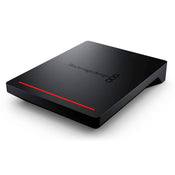
Blackmagic Cloud Pod
Blackmagic Cloud Pod
The Blackmagic Design Cloud Pod allows you to turn any USB-C disk into network storage, suitable for sharing a media disk recorded on a camera with multiple users on your network. It features a high speed 10G Ethernet connection for extremely fast file access. It’s fast, even with lots of simultaneous users all accessing files at the same time. With Dropbox live sync, files can be distributed between multiple units globally, for very fast local file access, even on lower cost internet connections. The Blackmagic Cloud Pod features and HDMI monitor output, making it the go-to solution for sharing files on a network.
The Blackmagic Cloud Pod features an extremely small and thin design because it doesn't have any storage internally. It’s also very quiet and very portable. It features two USB-C ports so it can host two separate USB disks on its network at the same time. The 10G Ethernet port means customers get extremely high performance. There is also an HDMI monitoring output so customers can watch a live graphic view of the storage operating on a TV or monitor.
With a separate, very high speed 10G Ethernet connection, Blackmagic Cloud Pod is very fast. The internal processing has been designed to saturate the 10G Ethernet port to its theoretical maximum speed, so customers get full performance from the very fast USB-C disks available today. When using flash USB-C disks, access has very low latency, so responsiveness is fast. Even when editing large 12K digital film RAW files. It’s so fast, multi-cam editing is very smooth, even if it’s used with large digital film camera files.
Now customers can set up a local cache of their Dropbox files. This makes working much faster because files are instantly available without needing to be downloaded from the internet. Customers can save space on their computer by moving cached Dropbox files to the Blackmagic Cloud Pod so everyone on their network can share them. Customers can even sync multiple Blackmagic Cloud Pods or Cloud Stores via Dropbox so people in different geographic locations can collaborate without latency because everyone has a local copy of the files.
The most exciting feature is the HDMI monitoring output. Simply connect a TV or computer monitor to get a live status of the Blackmagic Cloud Pod. The storage map shows a graphic representation of the memory core and real-time read and writes access happening for the connected users. There are also graphs that show customers the data transfers on the Ethernet connection. The main space indicator shows customers the capacity of the two USB-C disks and how much is currently being used. The status for each Dropbox connection is also shown.
The Blackmagic Cloud Pod has a high speed 10G Ethernet port, which is only found on expensive workstation computers. With 10G Ethernet, customers get 10 times the speed of regular Ethernet. Plus most computers can be upgraded to add 10G Ethernet. Even when connected to an Ethernet switch with dozens of users accessing files at the same time. The Ethernet also features very low latency for fast access times. That’s similar performance to expensive business SANs but in a low-cost design that customers can install themselves.
One of the big advantages of the Blackmagic Cloud Pod is its private storage that customers fully control. There are no subscriptions to sign up for. There are no monthly license fees. There is no tracking of their usage or data. Customers don't even need to log into a web page to maintain the storage settings, because Blackmagic Cloud Pod uses a free to download software utility that runs on Mac and Windows. That means customers can run a private network, totally disconnected from the internet. This is critical for many security standards where computer networks cannot be connected to the external internet.
When customers need to change settings, customers can use the Blackmagic Cloud Pod utility that's available on Mac and Windows. In many ways, it plugs in just like a regular hard disk. That means it's so easy to set up, that customers won't need an IT person to get started. However, if customers want to customize their network, then the utility software lets customers change the network settings in the Cloud Pod. The utility also lets customers add Dropbox to sync folders.
Price Match
Fill out the price match form below, and we will be in touch shortly.
Price Match
Fill out the price match form below, and we will be in touch shortly.
Checking availability...
Product Overview
Blackmagic Cloud Pod

Need advice?
Speak to one of our dedicated Australian-based sales team members.
Price Match
Fill out the price match form below, and we will be in touch shortly.
Price Match
Fill out the price match form below, and we will be in touch shortly.
Product Reviews
Blog posts

Beauty Lighting: How to Combine Hard and Soft Light to Make S...
A working beauty photographer’s guide to combining hard and soft light, beauty dish vs softbox, grids, negative fill and a clamshell setup you can copy, for skin that pops.
View post
Everyone Can Take a Picture. Not Everyone Can Hold the Room
What an agent, a Vogue visuals producer and a brand-side creative lead really look for in photographers now. There is a point in almost every creative career where the work alone stops...
View post
Beyond Reach: My Experience With the Fujifilm XF400mmF4.5 Sup...
Explore our hands-on experience with the Fujifilm XF400mmF4.5, covering its sharpness, autofocus, reach and performance for sport, wildlife, landscapes and portraits.
View post
Learn to Get the Shot Right In-Camera
Beauty photography tips from Oliver Minnett’s Georges workshop, covering lighting, direction, working with a creative team, and using Sony and Profoto gear.
View post
Stop Trying to Learn Everything at Once
Beauty photography tips from Oliver Minnett’s Georges workshop, covering lighting, direction, working with a creative team, and using Sony and Profoto gear.
View post
Beauty Photography Tips: Three Things I Wish I Knew Earlier
Beauty photography tips from Oliver Minnett’s Georges workshop, covering lighting, direction, working with a creative team, and using Sony and Profoto gear.
View post
How We Lit Karla Spetic's Australian Fashion Week Show with P...
We were invited by Karla Spetic to help light her runway, we chose Profoto's new LED lights for the job!
View post
Sony A7R VI First Thoughts: A Portrait Photographer’s Take on...
Sony has just launched the new Sony A7R VI, the latest camera in its high-resolution Alpha line, and I was lucky enough to spend some time with it earlier this week. I...
View post
Mobile Podcasting Setups Explained: From First Rig to Full Pr...
Mobile podcasting isn’t about shortcuts. It’s about picking gear that actually works, in the places podcasts actually happen. I used to chase the “best” setup. Turns out, the best setup is the...
View post
Rigging Up Your Sony Cinema Camera
Rigging gets a bad rap because a lot of rigs are built backwards. People buy parts first, bolt everything on, and end up with a camera that looks serious but shoots worse....
View post


