
















-v1665700116905.png?500x500&options=w_150)




















































































































Blackmagic ATEM Micro Camera Panel
Blackmagic ATEM Micro Camera Panel
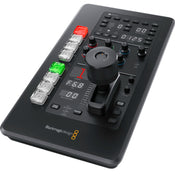
Control up to eight URSA Mini Pro, URSA Broadcast, or Blackmagic Studio cameras with the ATEM Micro Camera Panel from Blackmagic Design. This compact cousin of the ATEM Camera Control panel features eight assignable NKK camera select buttons, red/green on/off air button illumination, a 3-axis joystick, and multiple controls for iris control, preview, gain, filters, shutter, white balance, and more. The panel operates on a built-in battery and charges via USB-C. It connects to a computer to use ATEM Software Control via USB-C and can also connect wirelessly via Bluetooth for a fully mobile experience.
Control up to Eight Cameras
When working on live production, all the cameras must be matched with the proper colour balance to get a consistent look as you cut and transition between them. The ATEM Micro Camera Panel allows you to choose between up to eight cameras in one panel. When used with a larger number of cameras, it's very quick to change which camera you control on each CCU channel. It features a full set of traditional CCU controls, so you always get a clear indication of the camera state.
Scene and Camera Controls
The top section on each camera control has settings for changing camera settings, plus it lets you save and recall scene presets. Getting remote access to important camera settings is vital when working in conditions where the light can change during your job, such as daylight. With these settings, you can quickly adjust cameras based on changes in the scene. Controls in this section include master gain, ND filters, white balance, shutter speed, and more.
Gain and Pedestal Controls
The center section features independent RGB controls for adjusting the camera colour for the white and black parts of the image. These red, green, and blue controls for adjusting blacks and whites mean you can accurately match multiple cameras, which is vital for cutting seamlessly without colour shifts. One trick experienced camera control operators use is to adjust only the red and blue channels, so you can add and remove red and blue tint without getting too far away from accurate colour.
Lens and Iris Controls
The main control for operating the cameras is the high-quality professional joystick to precisely adjust the iris when moved up and down and the master black when the knob is rotated. This is the same type of control used on broadcast camera control units, so you get a true professional user interface. There's also a call button for communicating with the camera operator, along with a panel lock button and indicators for the network, power, and cable connection to the camera.
Key Features:
Compact Camera Control Panel
Control up to 8 Cameras
Joystick Control, Red/Green Tally LEDs
USB-C or Bluetooth Computer Connections
Battery Powered with Power Switch
CCU Channels to Control More Cameras
Aux Output, RGB Balance Knob Controls
What's in the Box:
Blackmagic ATEM Micro Camera Panel
USB-C Cable
Price Match
Fill out the price match form below, and we will be in touch shortly.
Price Match
Fill out the price match form below, and we will be in touch shortly.
 If you'd like to know when it's due, we're here to help!
 Call us during business hours at 02 9299 0177.
 Chat live with our team on-site.
 Or email us anytime at info@georges.com.au with the subject "Awaiting Arrival"
Checking availability...
Product Overview
Blackmagic ATEM Micro Camera Panel
Control up to eight URSA Mini Pro, URSA Broadcast, or Blackmagic Studio cameras with the ATEM Micro Camera Panel from Blackmagic Design. This compact cousin of the ATEM Camera Control panel features eight assignable NKK camera select buttons, red/green on/off air button illumination, a 3-axis joystick, and multiple controls for iris control, preview, gain, filters, shutter, white balance, and more. The panel operates on a built-in battery and charges via USB-C. It connects to a computer to use ATEM Software Control via USB-C and can also connect wirelessly via Bluetooth for a fully mobile experience.

Need advice?
Speak to one of our dedicated Australian-based sales team members.
Price Match
Fill out the price match form below, and we will be in touch shortly.
Price Match
Fill out the price match form below, and we will be in touch shortly.
Product Reviews
Blog posts

Beauty Lighting: How to Combine Hard and Soft Light to Make S...
A working beauty photographer’s guide to combining hard and soft light, beauty dish vs softbox, grids, negative fill and a clamshell setup you can copy, for skin that pops.
View post
Everyone Can Take a Picture. Not Everyone Can Hold the Room
What an agent, a Vogue visuals producer and a brand-side creative lead really look for in photographers now. There is a point in almost every creative career where the work alone stops...
View post
Beyond Reach: My Experience With the Fujifilm XF400mmF4.5 Sup...
Explore our hands-on experience with the Fujifilm XF400mmF4.5, covering its sharpness, autofocus, reach and performance for sport, wildlife, landscapes and portraits.
View post
Learn to Get the Shot Right In-Camera
Beauty photography tips from Oliver Minnett’s Georges workshop, covering lighting, direction, working with a creative team, and using Sony and Profoto gear.
View post
Stop Trying to Learn Everything at Once
Beauty photography tips from Oliver Minnett’s Georges workshop, covering lighting, direction, working with a creative team, and using Sony and Profoto gear.
View post
Beauty Photography Tips: Three Things I Wish I Knew Earlier
Beauty photography tips from Oliver Minnett’s Georges workshop, covering lighting, direction, working with a creative team, and using Sony and Profoto gear.
View post
How We Lit Karla Spetic's Australian Fashion Week Show with P...
We were invited by Karla Spetic to help light her runway, we chose Profoto's new LED lights for the job!
View post
Sony A7R VI First Thoughts: A Portrait Photographer’s Take on...
Sony has just launched the new Sony A7R VI, the latest camera in its high-resolution Alpha line, and I was lucky enough to spend some time with it earlier this week. I...
View post
Mobile Podcasting Setups Explained: From First Rig to Full Pr...
Mobile podcasting isn’t about shortcuts. It’s about picking gear that actually works, in the places podcasts actually happen. I used to chase the “best” setup. Turns out, the best setup is the...
View post
Rigging Up Your Sony Cinema Camera
Rigging gets a bad rap because a lot of rigs are built backwards. People buy parts first, bolt everything on, and end up with a camera that looks serious but shoots worse....
View post


