
















-v1665700116905.png?500x500&options=w_150)




















































































































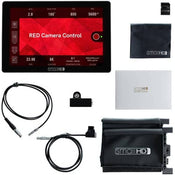
SmallHD Cine 7 Red DSMC2 Kit
SmallHD Cine 7 Red DSMC2 Kit
Use the lightweight Cine 7 Touchscreen On-Camera Monitor with RED Control Kit from SmallHD to provide professional monitoring for your RED DSMC2 camera with a sharp 7" display suitable for indoor or outdoor use. The kit includes the Cine 7 monitor, an L-series battery mount, a sun hood, a screen protector, an 8GB SD card, and the RED DSMC2 camera control kit that includes software, cables, and a USB adapter.
The Cine 7 monitor supports up to UHD 4K HDMI output as well as various HD and SD formats via one full-size HDMI input, one HDMI output, one 3G-SDI input, and one 3G-SDI selectable input/output. The monitor also supports cross conversion from HDMI to SDI and from SDI to HDMI.
The RED control software loads onto the monitor and allows you to control RED camera functions via the RCP protocol such as run/stop, colour and exposure controls, status, colour temperature, video format, playback, shutter, menu control, and more, all via the Cine 7 touchscreen. The control cable, SDI cable, and USB-to-LEMO adapter allow the monitor to connect to the camera.
The Cine 7 features a bright 1800 cd/m², 322 PPI, 1920 x 1200 IPS LCD touchscreen with 3D LUT compatibility. Using the intuitive Swipe OS3, you can turn on and save pages of various monitoring tools and focusing aids with a finger tap. At the rear of the monitor, an L-series battery mount enables you to power the unit.
Features:
Daylight-viewable, 7" touchscreen on-camera monitor with 1800 cd/m² brightness
RED DSMC2 camera control kit includes control and power cables as well as the RED control software
RED software works with RCP protocol to control functions such as run/stop, colour and exposure controls, status, colour temperature, video format, playback, shutter, menu control, and more
Slim, lightweight design with 10-bit, touchscreen IPS LCD panel
Supports up to 1080p60 video via full-size HDMI and 3G-SDI inputs
HDMI-to-SDI and SDI-to-HDMI cross conversion is supported
Uses SmallHD Swipe OS3 to organize and save customized function and settings pages
Power with an L-series battery plate
Four 1/4"-20 mounting points on top, left, right, and back
An 8GB SD card, screen protector, sun hood, and cleaning cloth are included
Software
Pixel zoom: 1.1 to 2x and 2 to 8x via swipe up/down, with pinch-zoom
DSLR scale: Canon 5D Mk II and Canon 7D
Custom scale: Underscan only
Anamorphic de-squeeze: 0.75x, 1.33x, 1.5x, 2.0x, 2.5x
Image flip: Auto and manual
Image rotation: Auto and manual
Colour focus assist: Adjustable style and intensity
Peaking: Adjustable intensity
False-colour: Spectrum, ARRI-style, and customizable
Dual zebra: Customizable
Waveform: Luma and RGB, customizable with the region of interest highlighting
Vectorscope: Yes
RGB parade: Customizable
Histogram: Luma and RGB
Image capture: With dedicated button and image gallery
Custom LUTs: Load as looks on pages or as system-wide calibration via the settings menu
LUT import: Via SD card or USB storage device
Image overlay: Opacity slider and blink setting
Audiometers: HDMI and SDI up to 8 channels
Price Match
Fill out the price match form below, and we will be in touch shortly.
Price Match
Fill out the price match form below, and we will be in touch shortly.
 If you'd like to know when it's due, we're here to help!
 Call us during business hours at 02 9299 0177.
 Chat live with our team on-site.
 Or email us anytime at info@georges.com.au with the subject "Awaiting Arrival"
Checking availability...
Product Overview
SmallHD Cine 7 Red DSMC2 Kit
Use the lightweight Cine 7 Touchscreen On-Camera Monitor with RED Control Kit from SmallHD to provide professional monitoring for your RED DSMC2 camera with a sharp 7" display suitable for indoor or outdoor use. The kit includes the Cine 7 monitor, an L-series battery mount, a sun hood, a screen protector, an 8GB SD card, and the RED DSMC2 camera control kit that includes software, cables, and a USB adapter.
The Cine 7 monitor supports up to UHD 4K HDMI output as well as various HD and SD formats via one full-size HDMI input, one HDMI output, one 3G-SDI input, and one 3G-SDI selectable input/output. The monitor also supports cross conversion from HDMI to SDI and from SDI to HDMI.
The RED control software loads onto the monitor and allows you to control RED camera functions via the RCP protocol such as run/stop, colour and exposure controls, status, colour temperature, video format, playback, shutter, menu control, and more, all via the Cine 7 touchscreen. The control cable, SDI cable, and USB-to-LEMO adapter allow the monitor to connect to the camera.
The Cine 7 features a bright 1800 cd/m², 322 PPI, 1920 x 1200 IPS LCD touchscreen with 3D LUT compatibility. Using the intuitive Swipe OS3, you can turn on and save pages of various monitoring tools and focusing aids with a finger tap. At the rear of the monitor, an L-series battery mount enables you to power the unit.

Need advice?
Speak to one of our dedicated Australian-based sales team members.
Price Match
Fill out the price match form below, and we will be in touch shortly.
Price Match
Fill out the price match form below, and we will be in touch shortly.
Product Reviews
Blog posts

Beauty Lighting: How to Combine Hard and Soft Light to Make S...
A working beauty photographer’s guide to combining hard and soft light, beauty dish vs softbox, grids, negative fill and a clamshell setup you can copy, for skin that pops.
View post
Everyone Can Take a Picture. Not Everyone Can Hold the Room
What an agent, a Vogue visuals producer and a brand-side creative lead really look for in photographers now. There is a point in almost every creative career where the work alone stops...
View post
Beyond Reach: My Experience With the Fujifilm XF400mmF4.5 Sup...
Explore our hands-on experience with the Fujifilm XF400mmF4.5, covering its sharpness, autofocus, reach and performance for sport, wildlife, landscapes and portraits.
View post
Learn to Get the Shot Right In-Camera
Beauty photography tips from Oliver Minnett’s Georges workshop, covering lighting, direction, working with a creative team, and using Sony and Profoto gear.
View post
Beauty Photography Tips: Three Things I Wish I Knew Earlier
Beauty photography tips from Oliver Minnett’s Georges workshop, covering lighting, direction, working with a creative team, and using Sony and Profoto gear.
View post
How We Lit Karla Spetic's Australian Fashion Week Show with P...
We were invited by Karla Spetic to help light her runway, we chose Profoto's new LED lights for the job!
View post
Sony A7R VI First Thoughts: A Portrait Photographer’s Take on...
Sony has just launched the new Sony A7R VI, the latest camera in its high-resolution Alpha line, and I was lucky enough to spend some time with it earlier this week. I...
View post
Mobile Podcasting Setups Explained: From First Rig to Full Pr...
Mobile podcasting isn’t about shortcuts. It’s about picking gear that actually works, in the places podcasts actually happen. I used to chase the “best” setup. Turns out, the best setup is the...
View post
Rigging Up Your Sony Cinema Camera
Rigging gets a bad rap because a lot of rigs are built backwards. People buy parts first, bolt everything on, and end up with a camera that looks serious but shoots worse....
View post
What Makes a Good Photographer? A Portfolio Deconstruction
Clyde Vaughan Guest post by Clyde Vaughan — ahead of Clyde's talk on January 22: “How to create incredible images: A talk by Clyde Vaughan”. If you ask “what makes a good...
View post


