


-v1665700116905.png?500x500&options=w_150)


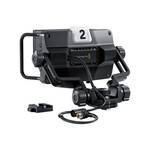















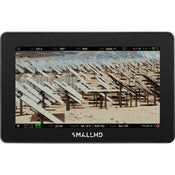
Monitor your camera with the SMALLHD CINE 5 1080P SDI/HDMI 2000nits LCD MONITOR. Featuring a sharp 5" display suitable for indoor or outdoor use, the CINE 5 monitor supports various HD and SD formats via one full-size HDMI input, one HDMI output, one 3G-SDI input, and one 3G-SDI selectable input/output. The monitor also supports cross conversion from HDMI to SDI and from SDI to HDMI. The CINE 5 features a bright 2000 cd/m², 1920 x 1080 LCD touchscreen with 3D LUT compatibility. Using the intuitive PageOS 5, you can turn on and save pages of various monitoring tools and focusing aids with a finger tap, and the CINE 5 also adds a joystick on the side and a button on the back for ease of use. There is a 5-pin USB output to utilise optional RED camera control. The monitor can be powered using its 2-pin power input.

SMALLHD CINE 5 1080P SDI/HDMI 2000nits LCD MONITOR
Monitor your camera with the SMALLHD CINE 5 1080P SDI/HDMI 2000nits LCD MONITOR. Featuring a sharp 5" display suitable for indoor or outdoor use, the CINE 5 monitor supports various HD and SD formats via one full-size HDMI input, one HDMI output, one 3G-SDI input, and one 3G-SDI selectable input/output. The monitor also supports cross conversion from HDMI to SDI and from SDI to HDMI. The CINE 5 features a bright 2000 cd/m², 1920 x 1080 LCD touchscreen with 3D LUT compatibility. Using the intuitive PageOS 5, you can turn on and save pages of various monitoring tools and focusing aids with a finger tap, and the CINE 5 also adds a joystick on the side and a button on the back for ease of use. There is a 5-pin USB output to utilise optional RED camera control. The monitor can be powered using its 2-pin power input.
Features
- Slim, lightweight, daylight-viewable, 5" touchscreen on-camera monitor with 2000 cd/m² brightness.
- HDMI-to-SDI and SDI-to-HDMI cross conversion is supported.
- Supports 10-bit 4:2:2 DCI-P3 color
- The included PageOS 5 Toolset with EL Zone Exposure Assist, best-in-class waveform, false color, look-Around Camera Control (sold separately), Advanced Teradek RT Overlays, and more. The PageOS 5 UI offers quick and repeatable setups and full control over all parameters and display tools.
- Power via 2-pin power input.
- Four 1/4"-20 mounting points on top, left, right, and back.
- Optional RED camera control.
RED Control Features
- Run/stop
- Color controls
- Exposure controls
- Status
- Color temperature
- Video format
- Playback
- Shutter
- Menu control
Software Features
- Pixel zoom: 1.1 to 2x and 2 to 8x via swipe up/down, with pinch-zoom
- DSLR scale: Canon 5D Mk II and Canon 7D
- Custom scale: Underscan only
- Anamorphic de-squeeze: 0.75x, 1.33x, 1.5x, 2.0x, 2.5x
- Image flip: Auto and manual
- Image rotation: Auto and manual
- Colour focus assist: Adjustable style and intensity
- Peaking: Adjustable intensity
- False colour: Spectrum, ARRI-style, and customisable
- Dual zebra: Customisable
- Waveform: Luma and RGB, customisable with region of interest highlighting
- Vectorscope: Yes
- RGB parade: Customisable
- Histogram: Luma and RGB
- Image capture: With dedicated button and image gallery
- Custom LUTs: Load as looks on pages or as system-wide calibration via the settings menu
- Image overlay: Opacity slider and blink setting
- Audio meters: HDMI and SDI up to eight channels
Price Match
Fill out the price match form below, and we will be in touch shortly.
Price Match
Fill out the price match form below, and we will be in touch shortly.
 If you'd like to know when it's due, we're here to help!
 Call us during business hours at
  Chat live with our team on-site.
 Or email us anytime at info@georges.com.au with the subject "Awaiting Arrival"
Checking availability...
Product Overview
Monitor your camera with the SMALLHD CINE 5 1080P SDI/HDMI 2000nits LCD MONITOR. Featuring a sharp 5" display suitable for indoor or outdoor use, the CINE 5 monitor supports various HD and SD formats via one full-size HDMI input, one HDMI output, one 3G-SDI input, and one 3G-SDI selectable input/output. The monitor also supports cross conversion from HDMI to SDI and from SDI to HDMI. The CINE 5 features a bright 2000 cd/m², 1920 x 1080 LCD touchscreen with 3D LUT compatibility. Using the intuitive PageOS 5, you can turn on and save pages of various monitoring tools and focusing aids with a finger tap, and the CINE 5 also adds a joystick on the side and a button on the back for ease of use. There is a 5-pin USB output to utilise optional RED camera control. The monitor can be powered using its 2-pin power input.

Need advice?
Speak to one of our dedicated Australian-based sales team members.
Price Match
Fill out the price match form below, and we will be in touch shortly.
Price Match
Fill out the price match form below, and we will be in touch shortly.
Product Reviews
Blog posts

Beauty Lighting: How to Combine Hard and Soft Light to Make S...
A working beauty photographer’s guide to combining hard and soft light, beauty dish vs softbox, grids, negative fill and a clamshell setup you can copy, for skin that pops.
View post
Everyone Can Take a Picture. Not Everyone Can Hold the Room
What an agent, a Vogue visuals producer and a brand-side creative lead really look for in photographers now. There is a point in almost every creative career where the work alone stops...
View post
Beyond Reach: My Experience With the Fujifilm XF400mmF4.5 Sup...
Explore our hands-on experience with the Fujifilm XF400mmF4.5, covering its sharpness, autofocus, reach and performance for sport, wildlife, landscapes and portraits.
View post
Learn to Get the Shot Right In-Camera
Beauty photography tips from Oliver Minnett’s Georges workshop, covering lighting, direction, working with a creative team, and using Sony and Profoto gear.
View post
Stop Trying to Learn Everything at Once
Beauty photography tips from Oliver Minnett’s Georges workshop, covering lighting, direction, working with a creative team, and using Sony and Profoto gear.
View post
Beauty Photography Tips: Three Things I Wish I Knew Earlier
Beauty photography tips from Oliver Minnett’s Georges workshop, covering lighting, direction, working with a creative team, and using Sony and Profoto gear.
View post
How We Lit Karla Spetic's Australian Fashion Week Show with P...
We were invited by Karla Spetic to help light her runway, we chose Profoto's new LED lights for the job!
View post
Sony A7R VI First Thoughts: A Portrait Photographer’s Take on...
Sony has just launched the new Sony A7R VI, the latest camera in its high-resolution Alpha line, and I was lucky enough to spend some time with it earlier this week. I...
View post
Mobile Podcasting Setups Explained: From First Rig to Full Pr...
Mobile podcasting isn’t about shortcuts. It’s about picking gear that actually works, in the places podcasts actually happen. I used to chase the “best” setup. Turns out, the best setup is the...
View post
Rigging Up Your Sony Cinema Camera
Rigging gets a bad rap because a lot of rigs are built backwards. People buy parts first, bolt everything on, and end up with a camera that looks serious but shoots worse....
View post


- Choosing a selection results in a full page refresh.
- Opens in a new window.