
















-v1665700116905.png?500x500&options=w_150)



















































































































Roland GO:LIVECAST Live Streaming Audio and Video Studio for Smartphones and Tablets
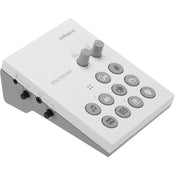
Easily create exciting webcasts from your smartphone or tablet with the Roland GO:LIVECAST, a complete live streaming production studio with a compact desktop interface and a flexible, interactive app. Its versatile I/O and tactile controls let you integrate multiple sound sources, control your device's camera, and trigger media files in no time.
With plug-and-play setup and intuitive icons labeling all ports and controls, the GO:LIVECAST is purpose built for user-friendly operations. Since it is compatible with popular streaming platforms and includes multiple cables for simple hookup to Lightning- or USB-equipped mobile devices, the GO:LIVECAST seamlessly fits in with your preferred workflow.
The companion app offers several features for enhancing the appearance of your webcast—a skin filter provides a softer look, in-camera mirroring delivers the correct left/right perspective to the viewer, automatic portrait/landscape switching. Incorporate a second smartphone camera via Wi-Fi to take advantage of split-screen views and one-touch camera switching for more complex video production techniques. Additionally, the app displays viewer comments in a scrolling window, so you can stay in tune with feedback from your audience.
Complete Miniature Webcasting Studio
Take control of your webcast's audio and video via the straightforward and customizable control layout. At your fingertips, clearly labeled buttons let you start your stream, show titles, and trigger various media files such as photos, videos, music, and sound effects in an instant.
Easy Setup and Operation
Forget about installing special drivers and fiddling with device settings; the GO:LIVECAST offers plug-and-play setup so you can get started right away. Simply connect your smartphone/tablet and a pair of headphones; you don't even need an external microphone because the GO:LIVECAST boasts a built-in mic, which also offers a reverb effect for added spaciousness. If your connected headset has an onboard mic, the GO:LIVECAST can utilize it instead.
Enhance Your Live Stream with Various Media
You don't need prior webcasting experience to use the GO:LIVECAST app's intuitive media tools and bring a competitive production quality to your content. There are preinstalled options for launching photos, videos, music, and sound effects, and you're free to build custom libraries at any time.
Push your productions further into the realm of professional with custom titles and text. To maximize efficiency and make your work easier, store media elements for different shows in Live Sets, which can be pulled up for easy access before you start streaming.
Supports Popular Streaming Platforms
The GO:LIVECAST app logs you into your accounts on popular streaming services such as Twitch, YouTube, and Facebook Live, enabling you to select a platform and press a button to begin your webcast. During your stream, a scrolling window in the app displays viewer comments.
Supports iOS and Android Platforms
The GO:LIVECAST is compatible with both iOS and Android devices, and includes Lighting and USB connectors.
Designed for Optimal Visuals
In the GO:LIVECAST's companion app, select your mobile device's front or rear camera and apply a skin filter for a softer, smoother appearance on camera. Your phone's position automatically determines portrait or landscape mode, and in-camera mirroring ensures that your audience will see you with the correct left/right perspective.
For more complex video production techniques, you can set up a second smartphone camera through Wi-Fi and either switch between the cameras or use them both in split-screen mode.
Versatile Connectivity
Since the XLR-1/4" combo input provides switchable 48V phantom power, you can use your preferred dynamic or condenser microphone. A dedicated 3.5mm stereo mini-jack input is provided to accommodate a line-level source such as a mixer, media player, synth, or drum machine. Use the 3.5mm stereo output to connect your favorite earbuds or headphones.
Via the GO:LIVECAST's four knobs, you're given effective control over the levels for the mic signal, line input, pad playback, and headphone output. Plus, there's a mic-mute button for times when you need to cut the mic feed if you need take a drink or cough.
Price Match
Fill out the price match form below, and we will be in touch shortly.
Price Match
Fill out the price match form below, and we will be in touch shortly.
 If you'd like to know when it's due, we're here to help!
 Call us during business hours at
  Chat live with our team on-site.
 Or email us anytime at info@georges.com.au with the subject "Awaiting Arrival"
Checking availability...
Product Overview
Easily create exciting webcasts from your smartphone or tablet with the Roland GO:LIVECAST, a complete live streaming production studio with a compact desktop interface and a flexible, interactive app. Its versatile I/O and tactile controls let you integrate multiple sound sources, control your device's camera, and trigger media files in no time.

Need advice?
Speak to one of our dedicated Australian-based sales team members.
Price Match
Fill out the price match form below, and we will be in touch shortly.
Price Match
Fill out the price match form below, and we will be in touch shortly.
Product Reviews
Blog posts
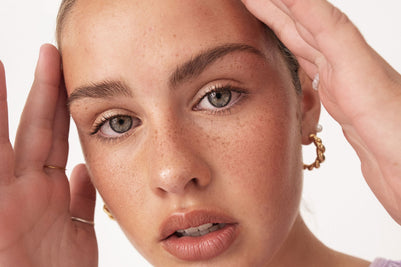
Beauty Lighting: How to Combine Hard and Soft Light to Make S...
A working beauty photographer’s guide to combining hard and soft light, beauty dish vs softbox, grids, negative fill and a clamshell setup you can copy, for skin that pops.
View post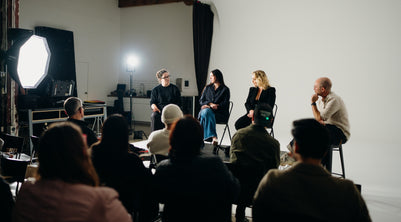
Everyone Can Take a Picture. Not Everyone Can Hold the Room
What an agent, a Vogue visuals producer and a brand-side creative lead really look for in photographers now. There is a point in almost every creative career where the work alone stops...
View post
Beauty Photography Tips: Three Things I Wish I Knew Earlier
Beauty photography tips from Oliver Minnett’s Georges workshop, covering lighting, direction, working with a creative team, and using Sony and Profoto gear.
View post
How We Lit Karla Spetic's Australian Fashion Week Show with P...
We were invited by Karla Spetic to help light her runway, we chose Profoto's new LED lights for the job!
View post
Sony A7R VI First Thoughts: A Portrait Photographer’s Take on...
Sony has just launched the new Sony A7R VI, the latest camera in its high-resolution Alpha line, and I was lucky enough to spend some time with it earlier this week. I...
View post
Mobile Podcasting Setups Explained: From First Rig to Full Pr...
Mobile podcasting isn’t about shortcuts. It’s about picking gear that actually works, in the places podcasts actually happen. I used to chase the “best” setup. Turns out, the best setup is the...
View post
Rigging Up Your Sony Cinema Camera
Rigging gets a bad rap because a lot of rigs are built backwards. People buy parts first, bolt everything on, and end up with a camera that looks serious but shoots worse....
View post
What Makes a Good Photographer? A Portfolio Deconstruction
Clyde Vaughan Guest post by Clyde Vaughan — ahead of Clyde's talk on January 22: “How to create incredible images: A talk by Clyde Vaughan”. If you ask “what makes a good...
View post
The End of the Generator? Hands-on with the DJI Power 2000
We’ve all been there: you’re on a remote shoot, beautiful location, but you’re either scrambling to find a power outlet or lugging a massive, noisy petrol generator through the bush. We’ve been...
View post
Why 2026 Might be the year to change from DSLR to Mirrorless
Alright—let’s do the DSLR vs mirrorless thing properly. Not “on paper”, not “in theory”, but head-to-head on the stuff that actually matters when you’re out shooting. My name's Oliver Minnett, I'm Georges...
View post


