
















-v1665700116905.png?500x500&options=w_150)




















































































































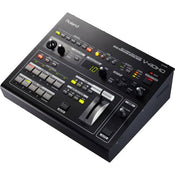
Roland 8 Channel Video Switcher
Roland 8 Channel Video Switcher
Four Multi-format Channels At The Pinnacle Of Hd Picture Quality
The Roland V-40HD Multi-Format Live Video Switcher is a welcomed addition to the powerful V-1600HD and V-800HD model lineup. The V-40HD Live Video Switcher is ideal for any live event or installation that requires the freedom to connect a variety of sources whether they be digital or analog, computer or video format. It is particularly positioned to support configurations using popular HDMI cameras as well as computers.
Features:
4 Channels (12 Inputs - 4 x HDMI, RGB/Component, Composite),
3 Outputs (HDMI/RGB/Component/Composite+HDMI/RGB/Component + HDMI)
4:4:4/10-bit Internal Processing (*4:2:2/8-bit Output Processing)
1 M/E (PinP) + DSK
Built-in frame synchronizers and scalers on all inputs
Input status LEDs
Full HDCP support
Preview monitor output (Four-way split-screen for Inputs, PST, PGM, or DSK)
Audio embedding
Audio delay to align the timing with video for perfect lip-sync
The V-40HD handles true multi-format video meaning there is no need to match input sources to the output resolution. Every input has it's own broadcast quality scaler that individually scales each source as required to fit any output resolution chosen.
The Roland V-40HD boasts twelve inputs on four channels plus one (background), and 5 output connectors with independent scalers on the inputs and output allowing you to connect HDMI/DVI, RGB, component and composite sources. It supports input/output resolutions up to 1080/60p or 1920x1200. The V-40HD is HDCP compliant which allows you to mix copy-protected game and Blu-ray content with other computer and camera sources. It features an input source multi-viewer output that provides a convenient monitoring solution when connected to an HDMI monitor.
The V-40HD is equipped with four input systems (Inputs 1 - 4). Each of these systems has three types of input connectors --- HDMI, RGB/Component, and Composite --- allowing you to connect a total of twelve video devices. For output, the V-40HD provides three systems: Output (HDMI, RGB/Component, Composite), Output 2 (HDMI, RGB/Component), and Preview (HDMI).
Supports 1080p video signals -twice the rate of conventional HD and uses 4:4:4/10-bit internal signal processing. This asserts all the vividness of high-realism, high-detail camera and computer sources.
*Output signal processing is 4:2:2/8-bit.
The V-40HD features an HDCP mode that lets you input and switch commercial digital video from sources such as Blu-ray Discs or game consoles encoded using HDCP digital copyright management technology. This lets you produce a video with unrestricted freedom --- for instance, compositing a video feed from a Blu-ray Disc or tablet computer against a background from a live camera. Output to a display can be made via HDMI.
*Commercial use of the content requires the permission of the copyright holder.
*In HDCP mode, only DVI-D/HDMI output can be used. Use of Component and Composite output is not possible.
*The display or projector connected to DVI-D/HDMI output must support HDCP.
The V-40HD can input background music, narration, or other analog sound sources, mix and sync the video and audio, and then output the result via HDMI.
Input
SCALING Zoom and Adjustment -The V-40HD features scalers that let you make settings independently for every input source. With these, you can take input sources of different resolutions and adjust to any sizing.
INPUT Selectors -Select from among HDMI, RGB/Component, and Composite as the connector for each input. With just one touch, you can access the video source from any of the three pieces of equipment connected to the respective inputs.
INPUT Connectors1 - 4 - Support for three formats per input. [HDMI] Up to WUXGA, 1080p [RGB/Component] Up to WUXGA, 1080p [Composite] 480i or 576i HDMI inputs support an embedded audio signal.
AUDIO INPUT Mix analog audio into HDMI video -The V-40HD is equipped with inputs for analog audio equipment. This enables you to embed analog audio in the HDMI video output.
Output
OUTPUT Selectors -Three types of output formats to choose from. Select SD, HD, or RGB simply by pressing a button.
PVW (Preview) Selectors -Chooses the view displayed on a preview monitor. Select a four-way split screen, PST, PGM or DSK to display. *The resolution and refresh rate of monitor output is fixed at 1920 x 1080/60 Hz (progressive). *Use an HDMI monitor that supports HDCP and 60p signals. *When INPUT is selected (four-way split), the sources are displayed using a reduced frame rate.
Output Connectors -Connect monitors, projectors, or recording equipment. [HDMI] Up to WUXGA, 1080p [RGB/Component] Up to WUXGA, 1080p [Composite] 480i or 576i *In HDCP mode, no video signals are output from the RGB/Component and composite connectors.
Effects
DSK -( Downstream Keyer) Composite logos and text into output video. You can overlay logos and text onto composited and switched video. Scene transitions underneath logos or text that remain displayed is possible. - P in P Two images can be combined into one video image. You can select any of four positions for an inset screen: top left, bottom left, top right, or bottom right. You can also freely adjust the size of the inset screen.
Wipe Pattern -Easy selection of video transition effects.
Video Fader -Switch the sources at the speed you want. Using the video fader (T-bar ) lets you carry out scene transitions, fade-ins, and fade-outs manually at exactly the speed you want.
Functions
MEMORY Save panel settings -You can save the V-40HD's settings in internal memory. Each of the five memory banks can hold five sets of settings, letting you save a total of 25 configurations.
Control Interface
Controllable the V-40HD via any MIDI device -A Roland digital audio mixer like the M-200i V-Mixer can link to the V-40HD for audio-follows-video application. Connect another V-40HD for more inputs.
Use RS-232C for integrated remote control -It's possible to connect a computer, wall panel or other remote device and use it to control switching, effects, and other operations.
USB PORT For saving the internal memory -This lets you connect a USB flash drive and save the internal memory to it.
The V-40HD also includes an audio input bus with volume and delay settings allowing you to embed audio into the HDMI output signal, which is especially useful for streaming and recording applications.
The Multi-Zoom feature can be enabled when one input source is shared internally with up to three more inputs – essentially daisy-chaining it. The scaler for each input can zoom into any position in the video image giving the appearance that additional cameras are connected – creating a virtual multi-camera environment. Additional effects include a downstream keyer (DSK), Picture-in-Picture and multiple transitions.
The unit is noise-free because of a unique and efficient heat-radiating design that eliminates the need for a cooling fan. Both MIDI and RS-232 are supported allowing control and integration with various devices like a V-Mixer for audio-follows-video applications or remote control using a wall panel.
The V-40HD supports a variety of system design and creative production options. The V-40HD's affordable price point and powerful features enable customers wanting to transition into an HD workflow. The V-40HD Video Mixer strengthens Roland's Multi-format video mixer line-up and is positioned to fill a variety of needs of video production for a live event, corporate, educational, and the house of worship applications using HDMI and computer sources.
Price Match
Fill out the price match form below, and we will be in touch shortly.
Price Match
Fill out the price match form below, and we will be in touch shortly.
 If you'd like to know when it's due, we're here to help!
 Call us during business hours at 02 9299 0177.
 Chat live with our team on-site.
 Or email us anytime at info@georges.com.au with the subject "Awaiting Arrival"
Checking availability...
Product Overview
Roland 8 Channel Video Switcher
Four Multi-format Channels At The Pinnacle Of Hd Picture Quality
The Roland V-40HD Multi-Format Live Video Switcher is a welcomed addition to the powerful V-1600HD and V-800HD model lineup. The V-40HD Live Video Switcher is ideal for any live event or installation that requires the freedom to connect a variety of sources whether they be digital or analog, computer or video format. It is particularly positioned to support configurations using popular HDMI cameras as well as computers.

Need advice?
Speak to one of our dedicated Australian-based sales team members.
Price Match
Fill out the price match form below, and we will be in touch shortly.
Price Match
Fill out the price match form below, and we will be in touch shortly.
Product Reviews
Blog posts

Beauty Lighting: How to Combine Hard and Soft Light to Make S...
A working beauty photographer’s guide to combining hard and soft light, beauty dish vs softbox, grids, negative fill and a clamshell setup you can copy, for skin that pops.
View post
Everyone Can Take a Picture. Not Everyone Can Hold the Room
What an agent, a Vogue visuals producer and a brand-side creative lead really look for in photographers now. There is a point in almost every creative career where the work alone stops...
View post
Beyond Reach: My Experience With the Fujifilm XF400mmF4.5 Sup...
Explore our hands-on experience with the Fujifilm XF400mmF4.5, covering its sharpness, autofocus, reach and performance for sport, wildlife, landscapes and portraits.
View post
Learn to Get the Shot Right In-Camera
Beauty photography tips from Oliver Minnett’s Georges workshop, covering lighting, direction, working with a creative team, and using Sony and Profoto gear.
View post
Stop Trying to Learn Everything at Once
Beauty photography tips from Oliver Minnett’s Georges workshop, covering lighting, direction, working with a creative team, and using Sony and Profoto gear.
View post
Beauty Photography Tips: Three Things I Wish I Knew Earlier
Beauty photography tips from Oliver Minnett’s Georges workshop, covering lighting, direction, working with a creative team, and using Sony and Profoto gear.
View post
How We Lit Karla Spetic's Australian Fashion Week Show with P...
We were invited by Karla Spetic to help light her runway, we chose Profoto's new LED lights for the job!
View post
Sony A7R VI First Thoughts: A Portrait Photographer’s Take on...
Sony has just launched the new Sony A7R VI, the latest camera in its high-resolution Alpha line, and I was lucky enough to spend some time with it earlier this week. I...
View post
Mobile Podcasting Setups Explained: From First Rig to Full Pr...
Mobile podcasting isn’t about shortcuts. It’s about picking gear that actually works, in the places podcasts actually happen. I used to chase the “best” setup. Turns out, the best setup is the...
View post
Rigging Up Your Sony Cinema Camera
Rigging gets a bad rap because a lot of rigs are built backwards. People buy parts first, bolt everything on, and end up with a camera that looks serious but shoots worse....
View post


