
















-v1665700116905.png?500x500&options=w_150)




















































































































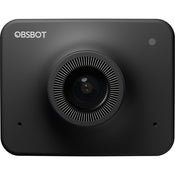
OBSBOT Meet 1080 Webcam
OBSBOT Meet 1080 Webcam
Compatible with a wide range of video conferencing software, the Meet HD Webcam from OBSBOT excels during remote group meetings. AI Auto-Framing operates in Landscape Closeup Mode, where it tracks your face and makes accurate adjustments, while Upper Body Mode includes your upper body, making it more suitable for presentations. When Group Mode is activated, the image will expand or shrink when someone enters or leaves the frame. While auto focus keeps the focus on you, users can further isolate themselves by using Face Focus, which blurs the background and helps you stand out.
The Meet HD streams Full HD 1080p video at up to 60 fps. It also features a 2x digital zoom, HDR for improved image quality, and dual omnidirectional mics with a 9.8' pickup range. It can be mounted using an included magnetic mount, or place it on a tripod using its 1/4"-20 thread. Compatible with Windows and Mac, the Meet HD may be connected to your host system using a USB Type-C port that supports 5 Gb/s USB 3.2 Gen 1 or 480 Mb/s USB 2.0. Also included is a USB Type-C to Type-C cable, a USB Type-C to Type-A adapter, a privacy cover, and a carrying bag.
HDR
Look great in most lighting conditions, thanks to HDR, which provides professional looks, even in conditions that aren't optimal.
AI Auto-Framing - Single Mode - Landscape Closeup
By default, AI Auto-Framing is in Landscape Closeup Mode, where your face is automatically tracked and the image will be adjusted for your current environment.
AI Auto-Framing - Single Mode - Upper Body
When Landscape Upper Body Mode is selected, the image will change its target from your face to your upper body, with a natural ratio that will appropriately frame you when doing presentations.
AI Auto-Framing - Group Mode
When activating AI Auto-Framing Group mode, the image will synchronously adjust whenever someone joins or leaves.
Auto Focus
Driven by OBSBOT AI technology, the Auto Focus feature on the OBSBOT Meet HD will always keep the focus in the middle of the image.
Face Focus
Turning on Face Focus functionality lets you keep the focus on your face. You'll then be able to adjust the bokeh, while also keeping your face distinct and bright.
Cable with a Switch
Physical privacy protection is always more effective. A separately-sold power cable with a switch will let you turn the power off without needing to unplug the camera from its USB connection.
Sleep Mode
Press the function button for 3 seconds to put the camera into sleep mode. While the camera is asleep, video and audio capture will stop.
Device Auto Sleep
Or, you can customise your device's sleep time using "Device Auto Sleep."
Privacy Shutter
When the camera isn't in use, you can cover the lens with an included privacy shutter.
Foldable Magnetic Mount - Compact and Portable
The foldable magnetic mount doesn't only provide a steady and secure placement on top of your display, but it also lets you adjust the camera's angle.
Universal 1/4"-20 Interface
The OBSBOT Meet HD features a universal 1/4"-20 interface that is compatible with mainstream tripods.
Blurred Background
Thanks to the integrated AI chip, the OBSBOT Meet HD can blur your background with just the click of a button. No extra apps are required and most webcam software is compatible.
Background Replacement
Customise your own background simply by clicking the button on the OBSBOT Meet HD. No other apps are required to give your video calls a whimsical background.
Green Screen Background
Besides the blurred background and background replacement, the OBSBOT Meet HD allows you to capture a real-time chroma key background which is easy to edit, as no extra equipment is required.
Key Features:
Full HD 1080p Video at 60 fps
AI Auto Focus with Digital Zoom
HDR | Auto Exposure | AI Auto Framing
86° Diagonal Field of View
Dual Omnidirectional Microphones
Virtual Background
USB Type-C Interface
Mounting Clip and 1/4"-20 Tripod Thread
Windows and Mac Compatible
What's in the Box:
OBSBOT Meet 1080 Webcam
USB Type-C to Type-C Cable
USB Type-C Female to Male Adapter
Camera Mount
Webcam Privacy Cover
Carrying Bag
Price Match
Fill out the price match form below, and we will be in touch shortly.
Price Match
Fill out the price match form below, and we will be in touch shortly.
 If you'd like to know when it's due, we're here to help!
 Call us during business hours at 02 9299 0177.
 Chat live with our team on-site.
 Or email us anytime at info@georges.com.au with the subject "Awaiting Arrival"
Checking availability...
Product Overview
OBSBOT Meet 1080 Webcam
Compatible with a wide range of video conferencing software, the Meet HD Webcam from OBSBOT excels during remote group meetings. AI Auto-Framing operates in Landscape Closeup Mode, where it tracks your face and makes accurate adjustments, while Upper Body Mode includes your upper body, making it more suitable for presentations. When Group Mode is activated, the image will expand or shrink when someone enters or leaves the frame. While auto focus keeps the focus on you, users can further isolate themselves by using Face Focus, which blurs the background and helps you stand out.

Need advice?
Speak to one of our dedicated Australian-based sales team members.
Price Match
Fill out the price match form below, and we will be in touch shortly.
Price Match
Fill out the price match form below, and we will be in touch shortly.
Product Reviews
Blog posts
Beauty Lighting: How to Combine Hard and Soft Light to Make S...
A working beauty photographer’s guide to combining hard and soft light, beauty dish vs softbox, grids, negative fill and a clamshell setup you can copy, for skin that pops.
View post
Everyone Can Take a Picture. Not Everyone Can Hold the Room
What an agent, a Vogue visuals producer and a brand-side creative lead really look for in photographers now. There is a point in almost every creative career where the work alone stops...
View post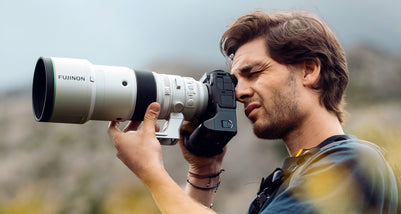
Beyond Reach: My Experience With the Fujifilm XF400mmF4.5 Sup...
Explore our hands-on experience with the Fujifilm XF400mmF4.5, covering its sharpness, autofocus, reach and performance for sport, wildlife, landscapes and portraits.
View post
Learn to Get the Shot Right In-Camera
Beauty photography tips from Oliver Minnett’s Georges workshop, covering lighting, direction, working with a creative team, and using Sony and Profoto gear.
View post
Stop Trying to Learn Everything at Once
Beauty photography tips from Oliver Minnett’s Georges workshop, covering lighting, direction, working with a creative team, and using Sony and Profoto gear.
View post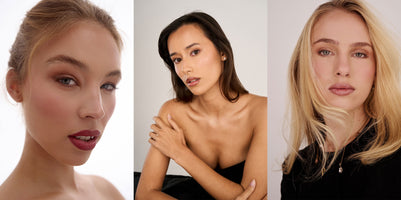
Beauty Photography Tips: Three Things I Wish I Knew Earlier
Beauty photography tips from Oliver Minnett’s Georges workshop, covering lighting, direction, working with a creative team, and using Sony and Profoto gear.
View post
How We Lit Karla Spetic's Australian Fashion Week Show with P...
We were invited by Karla Spetic to help light her runway, we chose Profoto's new LED lights for the job!
View post
Sony A7R VI First Thoughts: A Portrait Photographer’s Take on...
Sony has just launched the new Sony A7R VI, the latest camera in its high-resolution Alpha line, and I was lucky enough to spend some time with it earlier this week. I...
View post
Mobile Podcasting Setups Explained: From First Rig to Full Pr...
Mobile podcasting isn’t about shortcuts. It’s about picking gear that actually works, in the places podcasts actually happen. I used to chase the “best” setup. Turns out, the best setup is the...
View post
Rigging Up Your Sony Cinema Camera
Rigging gets a bad rap because a lot of rigs are built backwards. People buy parts first, bolt everything on, and end up with a camera that looks serious but shoots worse....
View post


