
















-v1665700116905.png?500x500&options=w_150)



















































































































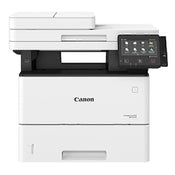
Canon MF543X Laser Multi-Function Printer
Canon MF543X Laser Multi-Function Printer
Canon MF543X wireless imageCLASS printer is the perfect way to boost productivity of a small workgroup within large organisations. MF543X is a user friendly printer, ready to network and operate from a convenient touch screen. It prints at a speed of 43ppm with the first page ready in 6.4 seconds Networked for optimum sharing and collaboration, it is easily controlled via a 5 inch Colour Touch LCD Display Compact and Resourceful. In office environments where space comes at a premium, the MF543X truly shines. This capable black and white A4 device approaches the quality print, scan and copy features Canon's larger products from a compact unit that slips into the tightest spots Security for Confidential Documents. The compact A4 black and white printer comes with the tight security to manage jobs and keep them confidential. Print directly from your connected Apple or Android smartphone or tablet, then release using your secure PIN code Clever Networker. With WiFi and Ethernet your MF543X is network ready and will work alongside PCL5e/6 and Adobe PostScript printer languages Perfect for Sharing. Sharing and collaboration is easy with the ability to capture, digitise and share documents on cloud storage services like Google Drive and DropBox Minimal effort, Maximum results. Enjoy easy cost-effective maintenance with an all-in-one Intermediate Transfer Unit, Photosensitive Drum and Waste Toner Container consumables Customised on-screen control. The Application Library means you can tailor your on-screen buttons for superior efficiency and intuitive use - print saved forms, scan to email and copy with just a single tap of a button Single Pass Duplex Scan. The 50-sheet single-pass Duplex Auto Document Feeder (DADF) consists of two Contact Image Sensors (CIS), allowing both sides of the document to be scanned simultaneously. This maximises scanning efficiency without any compromise in scan quality Scan Legal-Sized Documents. Fitted with the Legal-sized (215.9 x 355.6mm) platen, users are able to scan up to Legal or Foolscap-sized documents from the platen glass Near Field Communication (NFC). Enjoy the added convenience of contactless printing with the NFC-enabled MF525x. Just tap to print.
What's in the Box:
Canon MF543X Laser Multi-Function Printer
Price Match
Fill out the price match form below, and we will be in touch shortly.
Price Match
Fill out the price match form below, and we will be in touch shortly.
 If you'd like to know when it's due, we're here to help!
 Call us during business hours at 02 9299 0177.
 Chat live with our team on-site.
 Or email us anytime at info@georges.com.au with the subject "Awaiting Arrival"
Checking availability...
Product Overview
Canon MF543X Laser Multi-Function Printer
Canon MF543X wireless imageCLASS printer is the perfect way to boost productivity of a small workgroup within large organisations. MF543X is a user friendly printer, ready to network and operate from a convenient touch screen. It prints at a speed of 43ppm with the first page ready in 6.4 seconds Networked for optimum sharing and collaboration, it is easily controlled via a 5 inch Colour Touch LCD Display Compact and Resourceful. In office environments where space comes at a premium, the MF543X truly shines. This capable black and white A4 device approaches the quality print, scan and copy features Canon's larger products from a compact unit that slips into the tightest spots Security for Confidential Documents. The compact A4 black and white printer comes with the tight security to manage jobs and keep them confidential. Print directly from your connected Apple or Android smartphone or tablet, then release using your secure PIN code Clever Networker. With WiFi and Ethernet your MF543X is network ready and will work alongside PCL5e/6 and Adobe PostScript printer languages Perfect for Sharing. Sharing and collaboration is easy with the ability to capture, digitise and share documents on cloud storage services like Google Drive and DropBox Minimal effort, Maximum results. Enjoy easy cost-effective maintenance with an all-in-one Intermediate Transfer Unit, Photosensitive Drum and Waste Toner Container consumables Customised on-screen control. The Application Library means you can tailor your on-screen buttons for superior efficiency and intuitive use - print saved forms, scan to email and copy with just a single tap of a button Single Pass Duplex Scan. The 50-sheet single-pass Duplex Auto Document Feeder (DADF) consists of two Contact Image Sensors (CIS), allowing both sides of the document to be scanned simultaneously. This maximises scanning efficiency without any compromise in scan quality Scan Legal-Sized Documents. Fitted with the Legal-sized (215.9 x 355.6mm) platen, users are able to scan up to Legal or Foolscap-sized documents from the platen glass Near Field Communication (NFC). Enjoy the added convenience of contactless printing with the NFC-enabled MF525x. Just tap to print.

Need advice?
Speak to one of our dedicated Australian-based sales team members.
Price Match
Fill out the price match form below, and we will be in touch shortly.
Price Match
Fill out the price match form below, and we will be in touch shortly.
Product Reviews
Blog posts

Beauty Photography Tips: Three Things I Wish I Knew Earlier
Beauty photography tips from Oliver Minnett’s Georges workshop, covering lighting, direction, working with a creative team, and using Sony and Profoto gear.
View post
How We Lit Karla Spetic's Australian Fashion Week Show with P...
We were invited by Karla Spetic to help light her runway, we chose Profoto's new LED lights for the job!
View post
Sony A7R VI First Thoughts: A Portrait Photographer’s Take on...
Sony has just launched the new Sony A7R VI, the latest camera in its high-resolution Alpha line, and I was lucky enough to spend some time with it earlier this week. I...
View post
Mobile Podcasting Setups Explained: From First Rig to Full Pr...
Mobile podcasting isn’t about shortcuts. It’s about picking gear that actually works, in the places podcasts actually happen. I used to chase the “best” setup. Turns out, the best setup is the...
View post
Rigging Up Your Sony Cinema Camera
Rigging gets a bad rap because a lot of rigs are built backwards. People buy parts first, bolt everything on, and end up with a camera that looks serious but shoots worse....
View post
What Makes a Good Photographer? A Portfolio Deconstruction
Clyde Vaughan Guest post by Clyde Vaughan — ahead of Clyde's talk on January 22: “How to create incredible images: A talk by Clyde Vaughan”. If you ask “what makes a good...
View post
The End of the Generator? Hands-on with the DJI Power 2000
We’ve all been there: you’re on a remote shoot, beautiful location, but you’re either scrambling to find a power outlet or lugging a massive, noisy petrol generator through the bush. We’ve been...
View post
Why 2026 Might be the year to change from DSLR to Mirrorless
Alright—let’s do the DSLR vs mirrorless thing properly. Not “on paper”, not “in theory”, but head-to-head on the stuff that actually matters when you’re out shooting. My name's Oliver Minnett, I'm Georges...
View post
Leica is now at Georges Cameras
Some cameras don’t just document your life; they become part of it. I bought a Leica M6 in 2012. Photography had always been a part of my life; my dad had run...
View post
5 Things to Know Before You Upgrade Your Camera
Upgrading your camera? Learn the 5 things that matter: sensor size, ergonomics, lenses, power/media, and colour/screens—so you can choose the right camera with confidence.
View post


